

Part of our WooCommerce Performance Optimization series. For the complete guide covering all performance factors, see Why Your WooCommerce Store Is Slow (And How to Fix It).
The Bottom Line on Headless WooCommerce
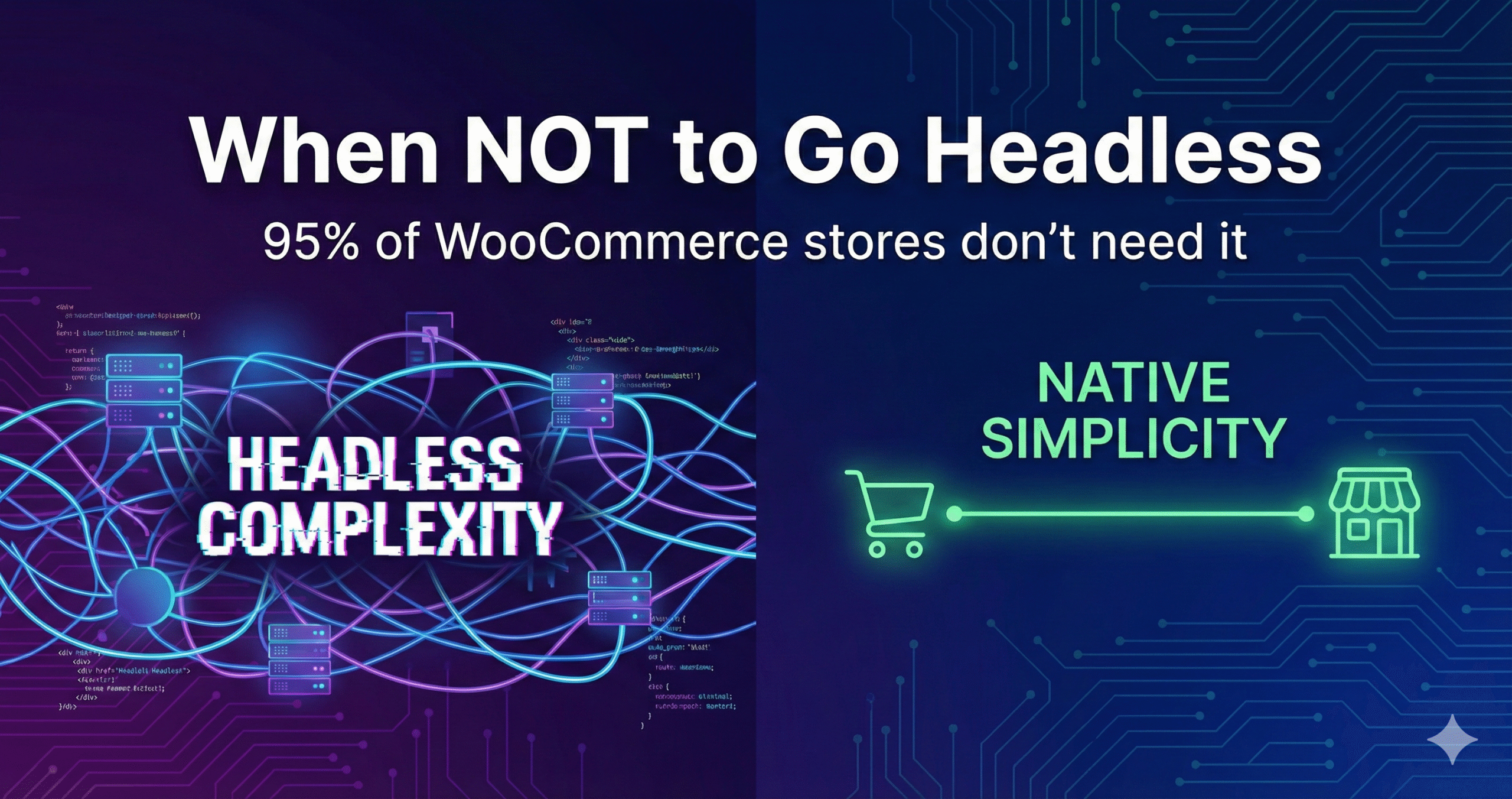
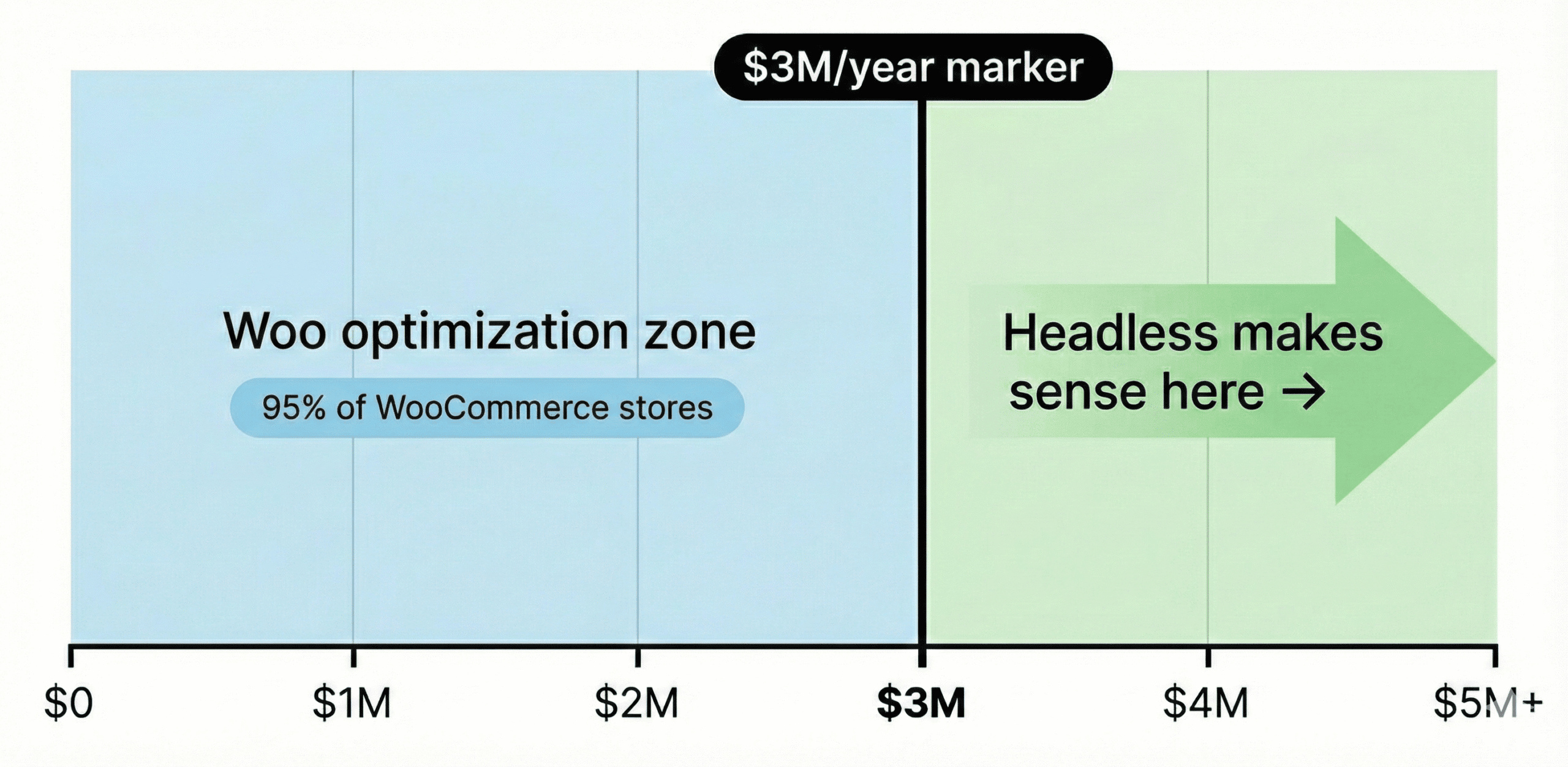
Headless WooCommerce makes financial sense only for stores doing $3M+ annually. Below that threshold, optimizing your existing WooCommerce store achieves the same performance at a third of the cost.
We’ve built and maintained headless WooCommerce stores for years—Gourmet Basket, Byron Bay Candles, Jackie Mack Designs, Squadron Nostalgia, Trophy Tackle. We know the performance gains are real. We also know the overhead, complexity, and ongoing costs that come with them.
Here’s what we’ve learned: 95% of WooCommerce stores with performance problems don’t need headless architecture. WooCommerce optimization achieves sub-second loads with payback in 3-4 months. Headless? 12-24 months, if the math ever works at all.
A note before we dive in: We work with all kinds of WooCommerce store owners. Some are hands-on technical founders who want to understand every detail. Others just want their store to work and prefer to leave the complexity to experts like us. Both approaches are valid.
If you’re here because your store is slow and someone suggested going headless, you’re in the right place. We’ll give you the honest answer—not the one that generates the biggest agency invoice.
If this guide starts to feel overwhelming, that’s actually the point—headless architecture is genuinely complex, which is why it costs $70-100K+ to implement properly. Skip to What to Do Instead for how we can help, or keep reading if you want to understand why headless probably isn’t your answer.
You’re Not Here by Accident
If you’re reading this, your WooCommerce store is probably slow. You’re watching potential customers leave because pages take too long to load. You know it’s costing you sales.
You’ve likely tried things already. A caching plugin that helped a little. Maybe you talked to a developer who quoted you $80K for a headless rebuild. You’ve read forum posts with conflicting advice—some saying headless is the future, others saying it’s overkill.
The frustration is real. The confusion is by design.
Headless projects are more billable. A $70-100K headless build generates far more agency revenue than a $20-30K optimization project. There’s also ongoing maintenance revenue—you’ll need specialized React/Next.js developers forever, not just for launch.
We’re not saying agencies are being dishonest. Many genuinely believe headless is the answer. But the financial incentives shape what gets recommended.
We’ve had hundreds of these conversations. Store owners come to us after being quoted $70-100K for headless, wondering if that’s their only option.
It’s not.
Here’s what we’ve learned from building headless stores for years—and why we now recommend WooCommerce optimization for 95% of stores with performance problems.
Why Headless Doesn’t Make Financial Sense for Most Stores
The Real Cost of Headless WooCommerce
Let’s be specific about what headless actually costs:
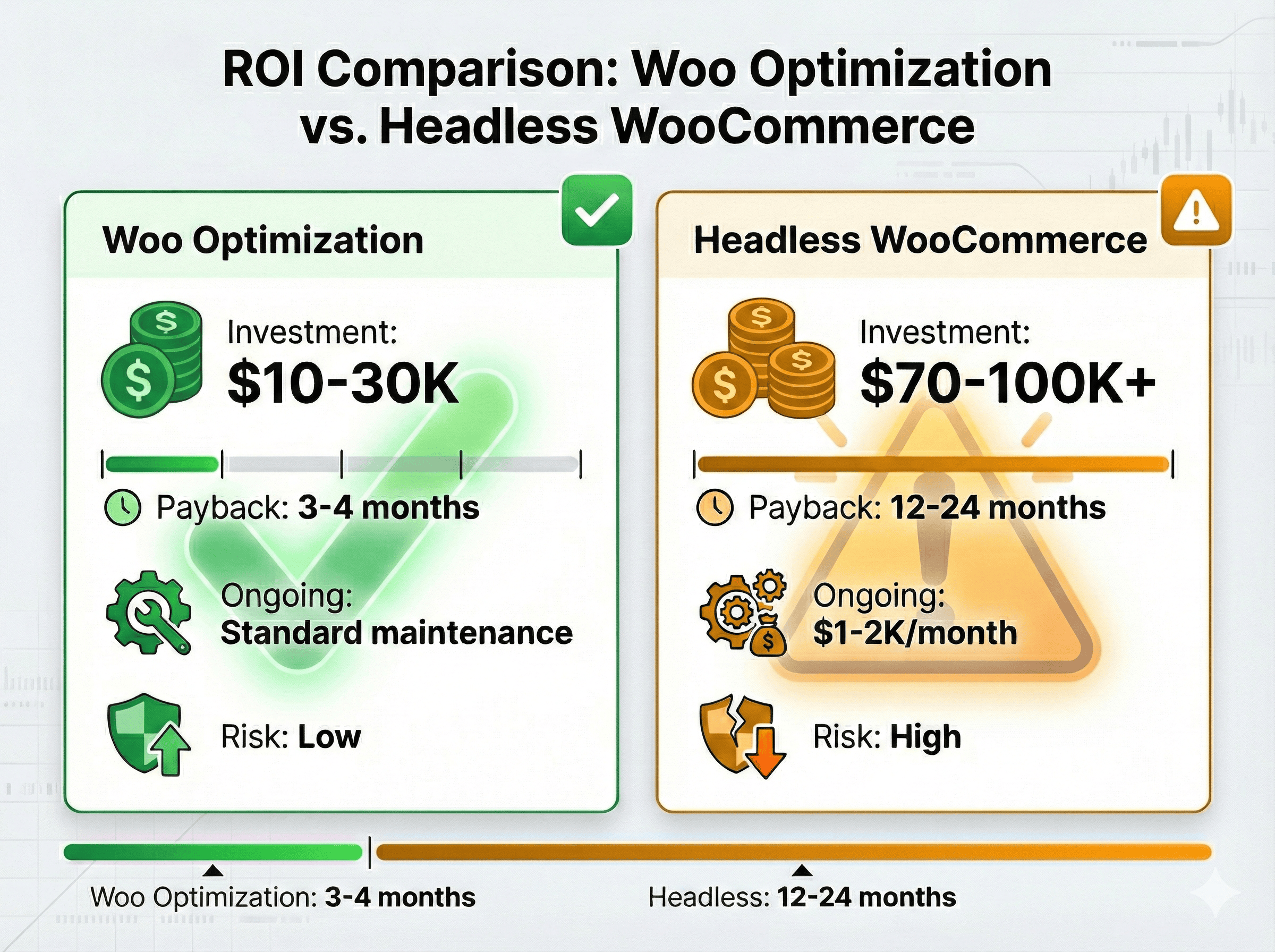
- Project cost: $70-100K minimum for a proper implementation
- Ongoing costs: $1-2K/month additional (specialized hosting, maintenance, React/Next.js developers on call)
- Year 1 total investment: $82-124K
Agencies quoting $30-50K are either cutting corners or don’t understand the full scope. Checkout integration alone—getting payment gateways working properly with a decoupled frontend—can consume weeks of specialized development time.
The Math That Actually Matters
Here’s the calculation most agencies skip:
To break even on a $100K headless investment in 12 months, you need to generate $100K in additional profit. At a typical 20% gross margin, that means $500K in additional revenue.
If headless gives you a 10% conversion lift (optimistic), your current annual revenue needs to be at least $5M for the math to work in year one.
Extend the payback period to 24 months and factor in ongoing costs, and the threshold drops to around $3M annual revenue.
Below that, the ROI doesn’t work. The investment never pays back in a reasonable timeframe.
Compare to WooCommerce Optimization
Optimizing your existing WooCommerce store costs roughly a third of headless. More importantly, the payback is 3-4 months based on increased conversion rates and average order values.
Same performance outcomes. Fraction of the investment. Faster ROI.
What Headless Agencies Don’t Tell You
The sales pitch focuses on speed and flexibility. Here’s what happens after you sign:
Plugin Compatibility Breaks
Most WooCommerce plugins assume traditional architecture. Subscription management, booking systems, product configurators, advanced shipping calculators—many don’t work with headless out of the box.
You’ll pay to rebuild functionality you already had. Sometimes tens of thousands of dollars for features that were working fine before.
Checkout Complexity
This is the most underestimated challenge. Payment gateways designed for traditional WordPress break in headless environments. Session management across decoupled frontends is consistently problematic.
We’ve seen headless projects blow past budget specifically because checkout integration took 3x longer than estimated. Stripe, PayPal, Afterpay—each has quirks when the frontend isn’t WordPress. A broken checkout costs revenue—and fixing it in a headless environment costs far more than fixing it in standard WooCommerce.
Fractured Support
When something breaks in a headless setup, who’s responsible?
- The frontend host (Vercel, Netlify)?
- The backend host (your WordPress server)?
- The API layer?
- Your frontend developers?
- Your backend developers?
You’re managing multiple vendors who point fingers at each other. Support tickets bounce between teams. Resolution takes longer. Downtime costs sales.
With standard WooCommerce on quality hosting, there’s one point of contact. Problems get solved faster.
Update Burden
Every WooCommerce update requires frontend testing. Every WordPress security patch needs verification against your custom frontend. Every new feature in WooCommerce core? Someone needs to check if it breaks your API connections.
The maintenance never stops. And it’s not WordPress-generalist maintenance—it’s specialized React/Next.js work at specialized rates.
Talent Dependency
You need React/Next.js developers forever. Not just for launch—for every feature addition, every bug fix, every integration.
Adding a simple feature that would take 2 hours in standard WooCommerce? 8-15 hours in headless because you’re working across decoupled systems.
You’re locked into specialized talent at specialized rates. If your developer leaves, finding a replacement who understands your specific headless setup takes time and costs money.
Your Existing WooCommerce Store Can Now Match Headless Performance
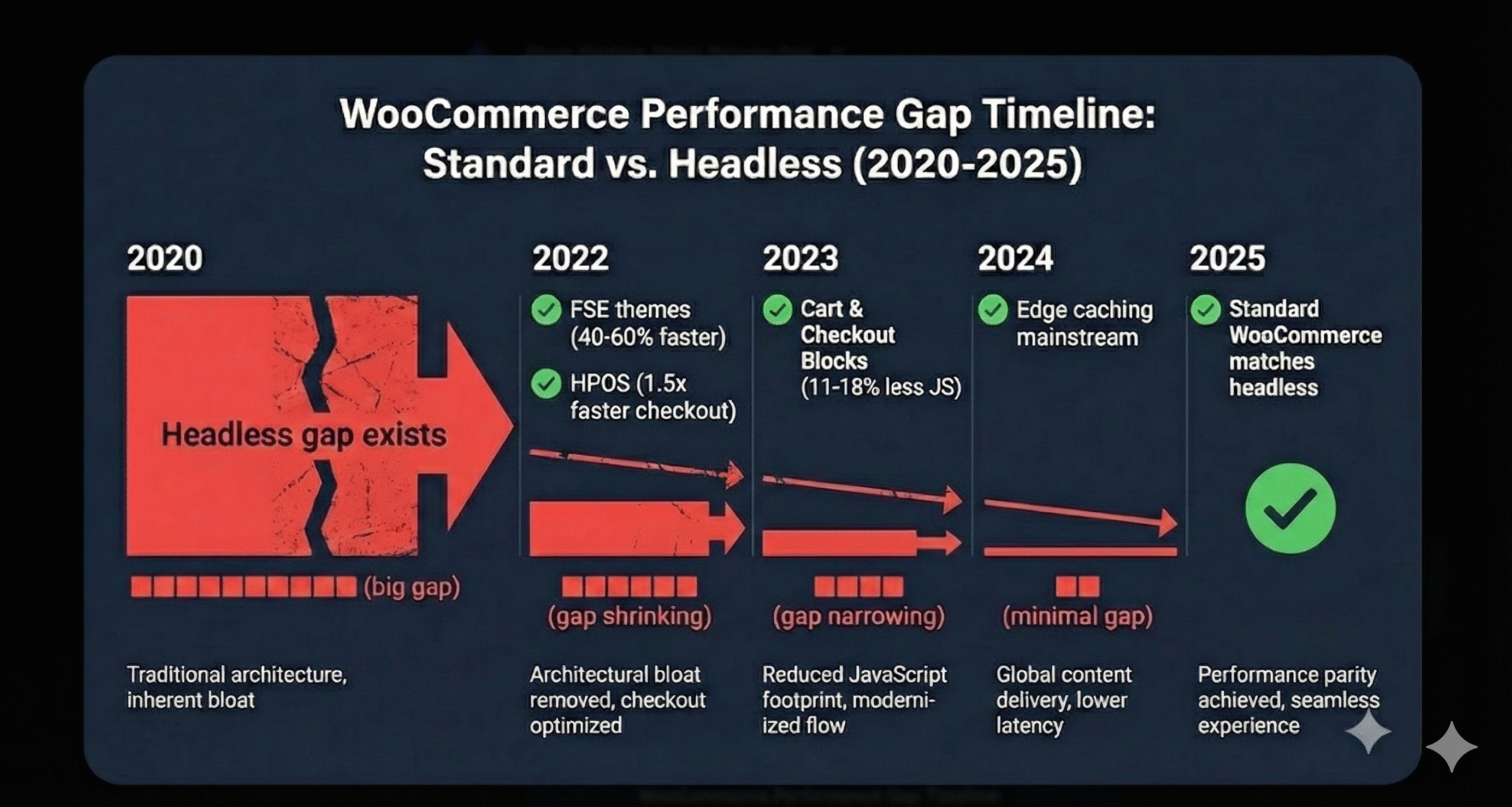
The performance gap that justified headless in 2020 has largely closed. Here’s what changed:
Edge Caching
Premium hosts like Kinsta now serve cached pages from edge locations worldwide. Your Australian customers get pages served from Sydney. Your UK customers from London. Your US customers from the nearest US data center.
Sub-second loads globally. No decoupling required.
Full Site Editing (FSE) Themes
Block-based themes eliminate the bloat that made WordPress slow. We’ve documented 40-60% performance improvements with FSE themes compared to traditional themes.
The architectural advantages that required headless in 2019? FSE themes now provide them natively.
HPOS (High-Performance Order Storage)
WooCommerce 8.2+ includes High-Performance Order Storage by default. The results:
- 1.5x faster checkout processing
- 40x faster dashboard searches
This was enterprise-grade performance that used to require custom development. Now it’s a checkbox in WooCommerce settings.
Cart & Checkout Blocks
WooCommerce 8.3+ uses block-based cart and checkout by default. The impact:
- 11-18% reduction in JavaScript payload
- Faster initial page loads
- Better mobile performance
Native checkout now performs like custom-built solutions.
The Result
We achieve sub-second loads with standard WooCommerce. The same performance tier that used to require $100K headless builds.
Proof That WooCommerce Optimization Works
What We’ve Achieved with Standard WooCommerce
| Store | Approach | Key Result |
|---|---|---|
| Truckers Toy Store | Optimized | 200%+ conversion increase |
| Infinite Defense | Optimized | PageSpeed 31 → 90 |
| LiteracyWorks | Optimized | Near-perfect performance scores |
| Porselli Dancewear | Optimized | Sub-second loads, mobile optimized |
These aren’t cherry-picked outliers. They’re representative of what WooCommerce optimization achieves when done properly—quality hosting, FSE themes, plugin optimization, and systematic UX improvements.
Compare to Our Headless Case Studies
| Store | Approach | Key Result |
|---|---|---|
| Gourmet Basket | Headless | 5.2s → 0.6s, +30% conversion |
| Byron Bay Candles | Headless | 4.8s → 0.6s, +38% mobile conversion |
| Squadron Nostalgia | Headless | 87% faster, +14.5% profitability |
Similar results. Dramatically different investment levels.
The headless stores performed brilliantly. But today, we achieve that same 0.6s load time with WooCommerce optimization—at a third of the cost.
The 5% Who Should Actually Go Headless
We still build headless. For the right clients, it’s the right solution. Here’s when:
Revenue Threshold: $3M+ Annual
The math works at this level. A $100K investment with 12-24 month payback is reasonable when you’re doing $250K+ monthly.
Below $3M? The investment timeline stretches beyond what makes business sense.
Significant International Traffic
Not “we have some customers in Europe.” Significant percentage of revenue from multiple continents where edge performance at scale matters.
If 40%+ of your revenue comes from outside your home country and you’re seeing performance-related drop-off in those markets, headless might be worth evaluating.
Multi-Channel Requirements
Same backend powering multiple frontends: web store, mobile app, in-store kiosk, IoT integrations.
If you genuinely need the same product data and order management flowing to multiple presentation layers, headless architecture solves that elegantly.
Custom Frontend Needs
Highly interactive experiences beyond standard ecommerce. Complex product configurators with real-time 3D rendering. AR try-on features. Filtering and navigation so complex that existing solutions can’t handle it.
If your UX requirements push past what WordPress can render, headless unlocks React/Vue/Next.js capabilities.
In-House Development Team
React/Next.js expertise already on staff. You’re not hiring specialized talent just for this project—you already have them.
The ongoing maintenance burden is manageable when the skills exist in-house.
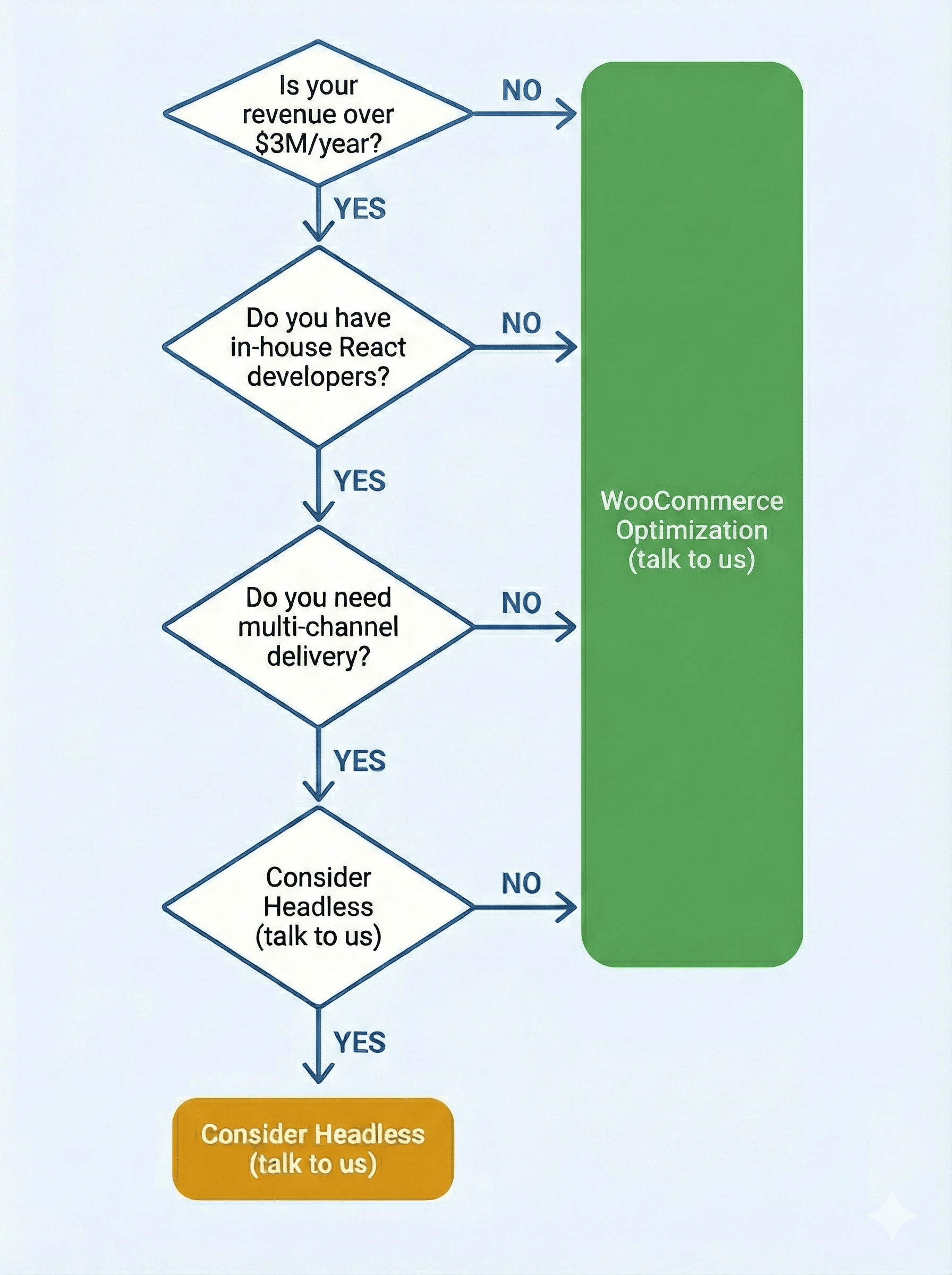
If you meet 3+ of these criteria, let’s talk about headless. For everyone else, WooCommerce optimization is the smarter investment.
Should You Go Headless? A Simple Checklist
Answer honestly:
- Is your revenue under $3M/year? → Optimize your existing store
- Do you have frontend developers on staff? → If no, optimize your existing store
- Is your primary goal faster page loads? → WooCommerce optimization achieves this
- Do you rely heavily on WooCommerce plugins? → Optimize (plugins often break with headless)
- Are you prepared for ongoing specialized maintenance? → If no, optimize your existing store
- Do you need multi-channel content delivery? → Consider headless
- Is your current store on shared hosting? → Start with hosting upgrade + optimization
Most store owners checking these boxes land firmly in WooCommerce optimization territory.
The Investment Comparison
WooCommerce Optimization
- Investment: A third of headless costs
- Payback: 3-4 months based on increased conversion rates and average order values
- Ongoing: Standard WooCommerce maintenance
- Risk: Low—you’re enhancing what you have, not rebuilding from scratch
Headless WooCommerce
- Investment: $70-100K+
- Payback: 12-24 months (if the math works for your revenue level)
- Ongoing: $1-2K/month additional costs + specialized development rates
- Risk: High—if it doesn’t deliver expected results, you’ve lost significant capital with limited recourse
The question isn’t “can you afford headless?” It’s “does the ROI make sense for your business?”
For 95% of WooCommerce stores, it doesn’t.
Frequently Asked Questions
Is headless WooCommerce faster than standard WooCommerce?
Not necessarily. With modern hosting (we use Kinsta), edge caching, FSE themes, and WooCommerce’s HPOS/Cart Blocks improvements, standard WooCommerce achieves sub-second loads globally.
We’ve documented 0.6s load times on optimized WooCommerce stores. The performance gap that existed in 2020 has largely closed.
Why do agencies push headless so hard?
Headless projects are more billable. A $70-100K headless build generates far more revenue than a $20-30K optimization project. There’s also ongoing maintenance revenue—specialized React/Next.js work at specialized rates.
We’re not saying agencies are being dishonest. Many genuinely believe headless is the answer. But the financial incentives shape what gets recommended.
Can I achieve sub-second loads without going headless?
Yes. We do it regularly.
The combination of premium hosting with edge caching, FSE themes, HPOS, optimized plugins, and proper performance tuning achieves the same results.
Our case studies show PageSpeed scores of 90+ and sub-second loads—all with standard WooCommerce.
What’s the real maintenance burden of headless?
Significant.
Every WooCommerce update requires frontend testing. Plugin updates can break API connections. You need React/Next.js developers on call—not WordPress generalists.
Support is fractured between multiple vendors. When something breaks, you’re coordinating between frontend host, backend host, and multiple developer teams.
We’ve maintained headless stores for years. The overhead is substantial.
How much does headless WooCommerce really cost?
$70-100K minimum for a proper implementation. Agencies quoting $30-50K are either cutting corners or don’t understand the full scope.
Add $1-2K/month ongoing for specialized hosting and maintenance.
Year one total: $82-124K.
What if I’ve already been quoted for headless?
Get a WooCommerce optimization assessment first.
Understand what performance improvements are possible without the headless investment. If optimization can achieve your goals, you’ve saved $50-70K.
If headless is genuinely necessary, you’ll have that validated by someone who’s built both approaches.
How do I know if my store actually needs headless?
Ask yourself:
- Is my revenue over $3M/year?
- Do I have in-house React developers?
- Do I need multi-channel content delivery?
- Am I prepared for 10x the ongoing complexity?
If you answered no to most of these, WooCommerce optimization is your answer.
What to Do Instead
Quick Wins You Can Do Today
- Test your current performance with GTmetrix, PageSpeed Insights, and WebPageTest. Document your baseline.
- Check your hosting. Shared hosting is almost always the bottleneck. If you’re on SiteGround, Bluehost, or similar shared plans, that’s your first problem.
- Audit your plugins. Deactivate anything you’re not actively using. Each plugin adds database queries and JavaScript. Less is faster.
- Enable HPOS if you haven’t already. WooCommerce → Settings → Advanced → Features. Free performance improvement.
When Professional Help Makes Sense
- Load times over 3 seconds on mobile
- Conversion rates below industry benchmarks
- PageSpeed scores under 50
- Monthly revenue over $20K (ROI hits in 3-4 months at this level)
What We Do
Performance audit identifying exactly what’s slowing your store. Not generic recommendations—specific issues with your specific setup.
Migration to Kinsta hosting with edge caching. Sub-second time to first byte globally.
FSE theme implementation for architectural performance gains. 40-60% faster than traditional themes.
Plugin audit and optimization. Remove what’s unnecessary. Replace what’s bloated. Configure what remains properly.
Our 239-point UX framework applied to your checkout, navigation, search, and product pages. Based on Baymard Institute research, implemented for WooCommerce.
ROI: 3-4 months. Same performance as headless. A third of the cost.
Your WooCommerce Store Doesn’t Need a $100K Rebuild
We’ve built headless stores. We’ve maintained them. We know the value they provide—and the overhead they create.
For 95% of WooCommerce stores with performance problems, optimization achieves the same results at a third of the cost, with payback in 3-4 months instead of 12-24.
Your store could be achieving sub-second loads, 90+ PageSpeed scores, and double-digit conversion improvements—without betting $100K on an architecture change.
See How Your Store Measures Up
Get your free performance analysis showing exactly where you’re losing conversions and how much revenue you’re leaving on the table.
Get Your Free Performance Analysis
Ready to discuss your specific situation?
Success Stories from Similar Stores
- Truckers Toy Store: 200%+ conversion increase (optimized)
- Infinite Defense: PageSpeed 31 → 90 (optimized)
- Gourmet Basket: 0.6s loads, +30% conversion (headless—we do both)