


What is headless commerce?
Headless commerce is an architecture where the storefront shoppers see is separated from the backend that runs the store. The frontend (the pages, the product views, the checkout interface) is built and served independently from the backend (orders, inventory, pricing, integrations). The two talk to each other through APIs. In a headless WooCommerce setup, WooCommerce stays in place as the backend, and a faster frontend application – often built on Next.js – renders what the customer interacts with.
Bottom line: headless is the fastest option, but a headless build runs $70K+ over 4-6 months, so the conversion lift has to pay that back – which usually means a store doing $3M+ a year with performance buckling under load. Below that, most stores reach the same half-second page loads (460-560ms) through WooCommerce optimization, at about a third of the cost and without rebuilding anything. This guide explains what headless is, how it works, and where the line sits for your store.
A note before we start: this guide gets into architecture and performance. If that is your world, the detail is here. If it is not, the short version is straightforward – headless makes a large store very fast, most stores do not need it, and WooCommerce optimization gets the rest of us most of the way there. Skip to the FAQ for what that means for your store, or keep reading to understand what is happening under the hood.
How headless commerce works
1. Decoupled architecture
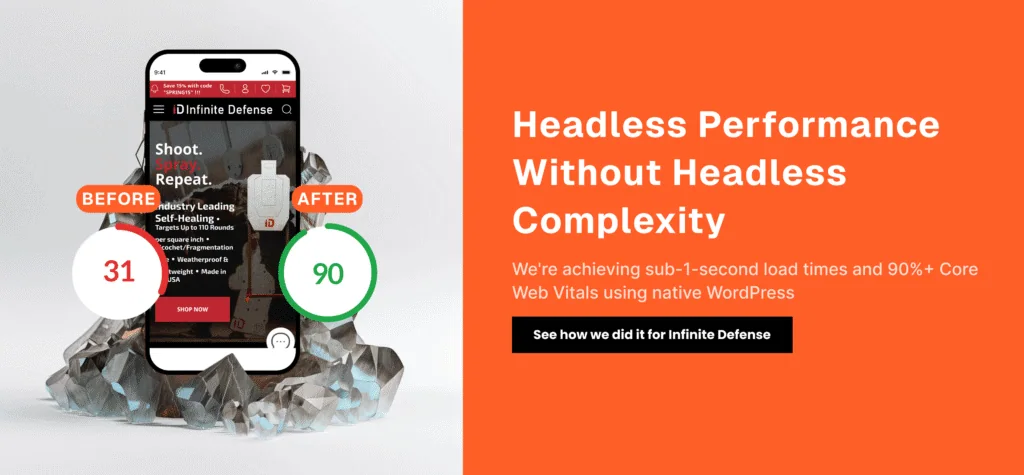
In a standard ecommerce setup, the backend and frontend are built as one unit: the WordPress theme renders the pages, and WooCommerce runs underneath. In headless commerce, those two layers are split apart and connected through APIs (Application Programming Interfaces). The APIs carry content, manage interactions, and process transactions between the two ends. Only the frontend layer changes, which is what makes the store fast. For a plain-English primer on the concept, Contentstack has a useful explainer on headless architecture.
2. API-driven flexibility
APIs are the connection point in headless commerce. They let the frontend pull data from the backend on demand. When a shopper searches for a product, the request goes to the backend through an API, which returns the product information. Because that link is API-based, a store can use any frontend framework – React, Vue.js, or Next.js – to build the customer experience. MuleSoft has a clear reference on how APIs work if you want the technical detail. On the search side, a tool like Typesense can serve fast, relevant results without loading the backend.
3. The role of the frontend framework
A modern frontend framework like Next.js supplies server-side rendering, incremental static regeneration, and performance defaults a PHP theme cannot match. The result, built properly, is better-structured pages, faster loads, and stronger SEO. The deeper technical reasoning is in headless WooCommerce with Next.js. The headless CMS pattern also lets a store push the same content to multiple touchpoints – web, mobile apps, kiosks – from one backend.
Benefits of headless commerce
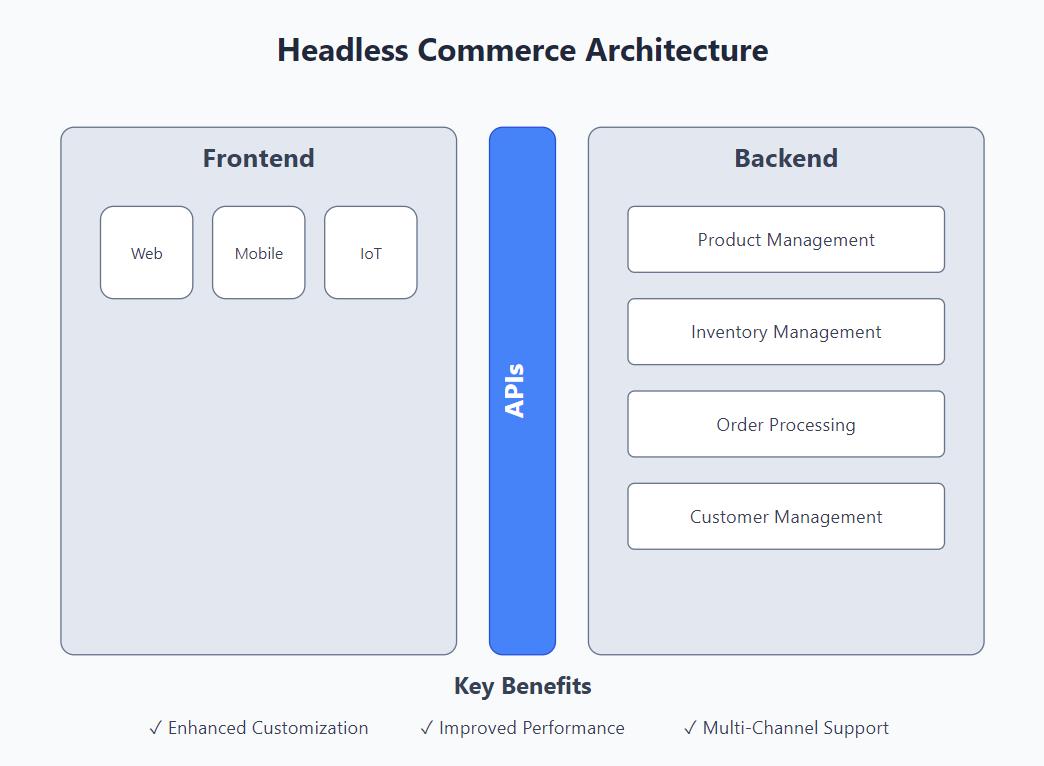
1. Tailored customer experiences
Because the frontend is not tied to the backend, developers can design the interface without backend constraints. For high-volume brands that need a distinctive storefront, this is the strongest argument for headless: the shopping experience is built to spec, not to a theme’s limits.
2. Performance and speed
The biggest measurable benefit of headless commerce is speed. With a modern framework on the frontend, a large store can hit page loads well under a second. Admerch cut page load times by 82% on a headless build. Worth keeping in perspective: most stores reach the same half-second loads (460-560ms) by optimizing their existing WooCommerce setup – no rebuild required. Google’s guidance on site speed covers why those numbers move conversions and rankings.
3. Multi-channel selling
Omnichannel retail is a growing pattern, and headless suits it. A decoupled architecture lets a store serve content across channels from one backend. Whether the customer is on a website, a mobile app, or a voice assistant, the backend stays consistent while each channel gets its own frontend.
4. Scalability
Headless architecture lets a store scale its frontend and backend independently. That makes it easier for a large brand to add features, change designs, or replace the frontend without overhauling the backend. For a store under heavy traffic, that independence is the practical payoff.
Headless is the fastest option. It is not the right one for most stores.
Here is the honest version most headless guides skip. A headless build is a real project: $70K+ in development, 4-6 months of work, and a separate frontend codebase to maintain afterwards. That spend only pays back when the conversion lift it buys is large enough to cover it – and in practice that means a store doing roughly $3M+ a year where performance is buckling under load.
Below that threshold, the math does not work. Most WooCommerce stores reach the same half-second page loads (460-560ms) through optimization of their existing setup – server tuning, database cleanup, plugin rationalization, image and caching work – at about a third of the cost and without rebuilding anything. The shopper gets the same fast store; the owner keeps the capital.
If you are weighing the decision, when not to go headless with WooCommerce walks through where the line sits and what to do on either side of it.
Challenges of headless commerce
1. Implementation complexity
Headless is harder to build than an all-in-one store. It takes more development expertise and ongoing coordination between developers and marketers to keep the frontend and backend in sync. For a team used to a standard WooCommerce theme, that is a real shift in how the site is maintained.
2. Higher cost
Splitting the frontend and backend means more services, tools, and APIs to run – and a higher bill than a standard store. The $70K+ build cost is only the start; the separate codebase carries ongoing maintenance. For a store doing $3M+ where speed is costing sales, that cost is recoverable. For most stores, it is not.
Who should consider headless commerce?
Headless is a strong fit for a specific kind of store, not a default. It suits:
- High-volume stores: roughly $3M+ a year, where performance is buckling under traffic and a faster frontend pays for itself in recovered conversions.
- Brands that need a custom storefront: businesses whose shopping experience has to be built to spec, beyond what a theme allows.
- Omnichannel retailers: companies serving a consistent backend across web, app, and other touchpoints.
For most stores – which is to say, almost everyone below that volume – the complexity and cost are not worth it. WooCommerce optimization reaches the same half-second loads for a fraction of the spend. The way to know which side of the line you are on is to measure it.
How to decide for your store
Start with the number, not the architecture. Before considering a headless build, measure where your store is losing revenue and what is slowing it down. For most stores the answer is not headless – it is the optimization work that gets you to half-second loads without a rebuild. The WooCommerce Revenue Audit diagnoses your store across performance, UX, analytics, and build, quantifies the revenue leaks, and tells you which side of the $3M line your store is on – and what to do about it.
Frequently asked questions
What is headless commerce, in plain terms?
It is a store where the storefront shoppers see is rendered by a separate, faster application – often built on Next.js – instead of the platform’s built-in theme. The backend (products, orders, inventory, integrations) stays in place. Only the frontend layer changes, which is what makes the store fast. In a headless WooCommerce setup, WooCommerce remains the backend.
Should my store go headless?
Probably not, and that is the honest answer for most stores. A headless build runs $70K+ over 4-6 months, so the conversion lift has to pay that back – which usually means a store doing $3M+ a year with performance buckling under load. Below that, WooCommerce optimization reaches the same half-second page loads (460-560ms) for about a third of the cost. When not to go headless walks through the decision.
Will going headless change how I run my store?
No. You keep the WooCommerce admin. Products, orders, pricing, and content are managed the same way, integrations keep working, and checkout stays on WooCommerce. What changes is the frontend layer the shopper sees.
How fast can headless WooCommerce go?
For a high-volume store built properly, well under a second. Admerch cut page load times by 82% on a headless build. That is a headless outcome for a large store; most stores that optimize their existing WooCommerce setup land in the 460-560ms range, which is fast enough that speed stops costing them sales.
What does the WooCommerce Revenue Audit include?
A paid, full diagnosis of your store across performance, UX, analytics, and build, with the specific revenue leaks quantified and a prioritized plan. It tells you whether headless is worth it for your store or whether optimization gets you there for far less. Start your audit here.