

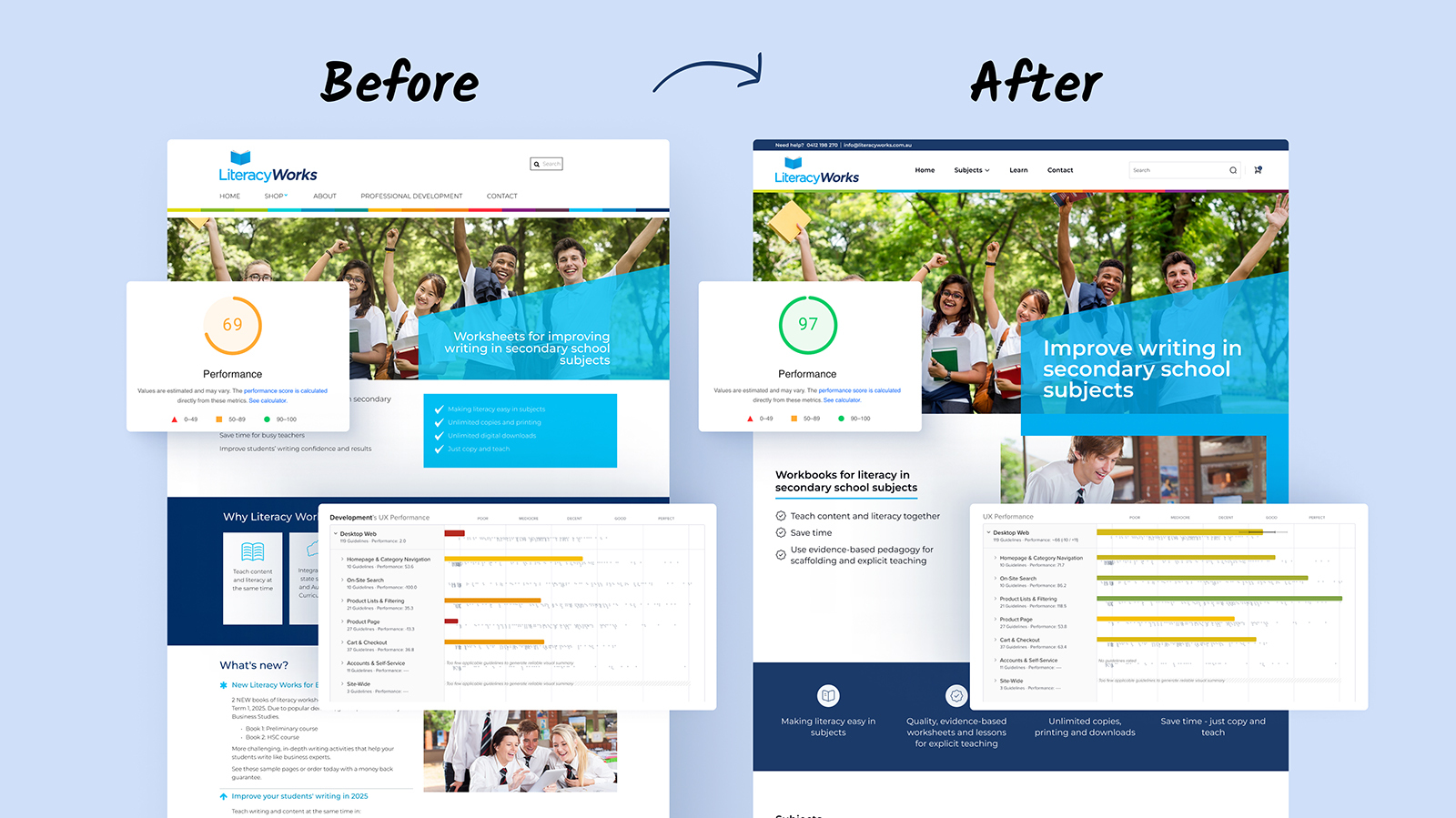
260% revenue growth. Sub-800ms page loads. Zero platform migration.
After 4 years of incremental work, Trish Weeks knew her WooCommerce store needed more than another band-aid. LiteracyWorks sells workplace literacy training materials – instant downloads and physical workbooks – to Australian businesses and government agencies. But the site was losing users with 4.2 second load times and sitting invisible in search with a 46/100 SEO score.
This article is part of our WooCommerce Performance Optimization series. For the complete guide covering why stores are slow and how to resolve it, start there.
Most agencies would have pitched a complete platform migration. New hosting. New architecture. Six-figure investment. Six-month timeline.
We delivered category-leading performance in 3 weeks on native WordPress and WooCommerce. Here’s how.
A note before we start: this case study gets into PageSpeed scores, UX failures, and the WooCommerce build underneath them. If that’s your world, the detail is all here. If it isn’t, the short version is simple – LiteracyWorks went from a slow, dated-feeling site to near-perfect performance and accessibility on plain WooCommerce, no platform migration, which matters when your buyers are government procurement officers. Skip to the FAQ for what that means for your store.
Accessibility: a procurement requirement, not a nice-to-have
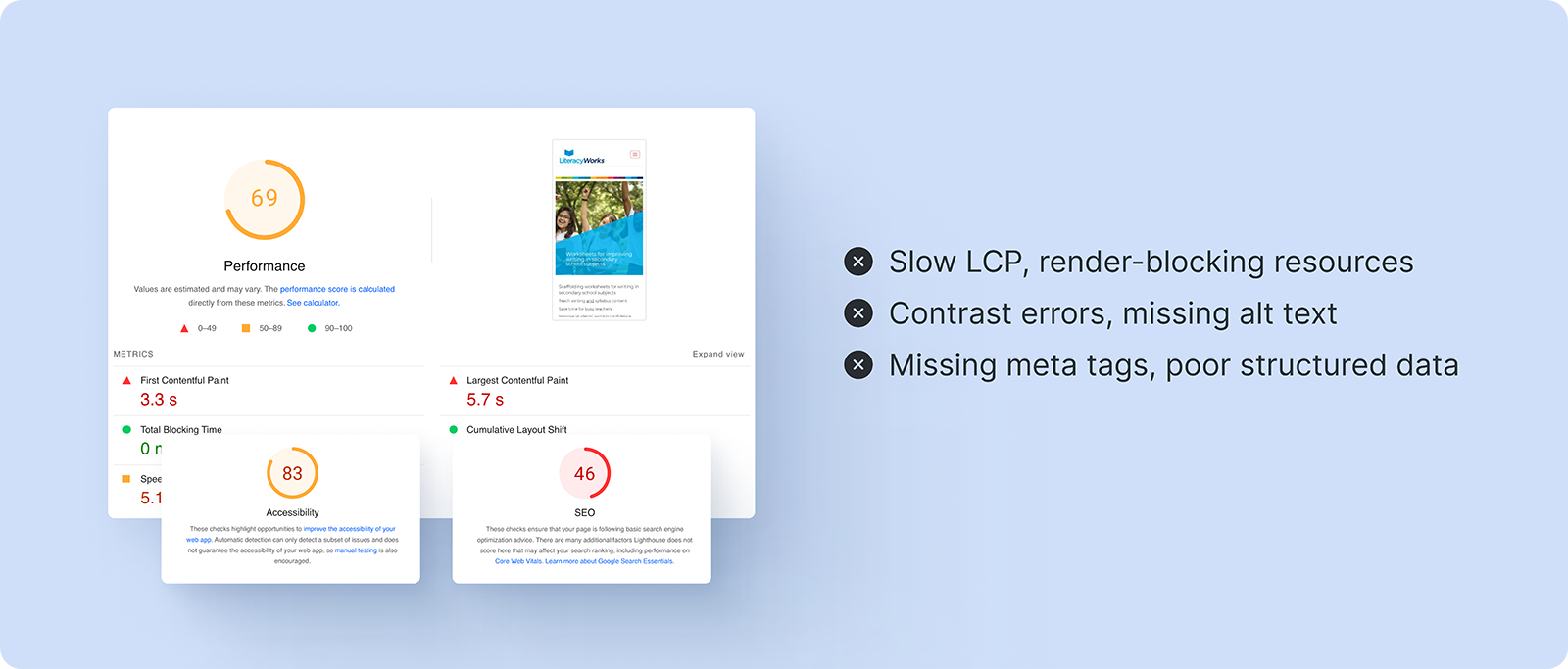
LiteracyWorks sells to government agencies, and public-sector buyers increasingly hold suppliers to accessibility standards. The site started at 83/100 on accessibility – workable, but short of where a vendor courting government contracts needs to be. As part of the same work, we took accessibility to 100/100: correct heading structure, sufficient color contrast, labeled form controls, keyboard-navigable checkout, and alt text across the catalog. For a store whose buyers answer to compliance officers, that score is part of the sales case, not a footnote.
What was broken
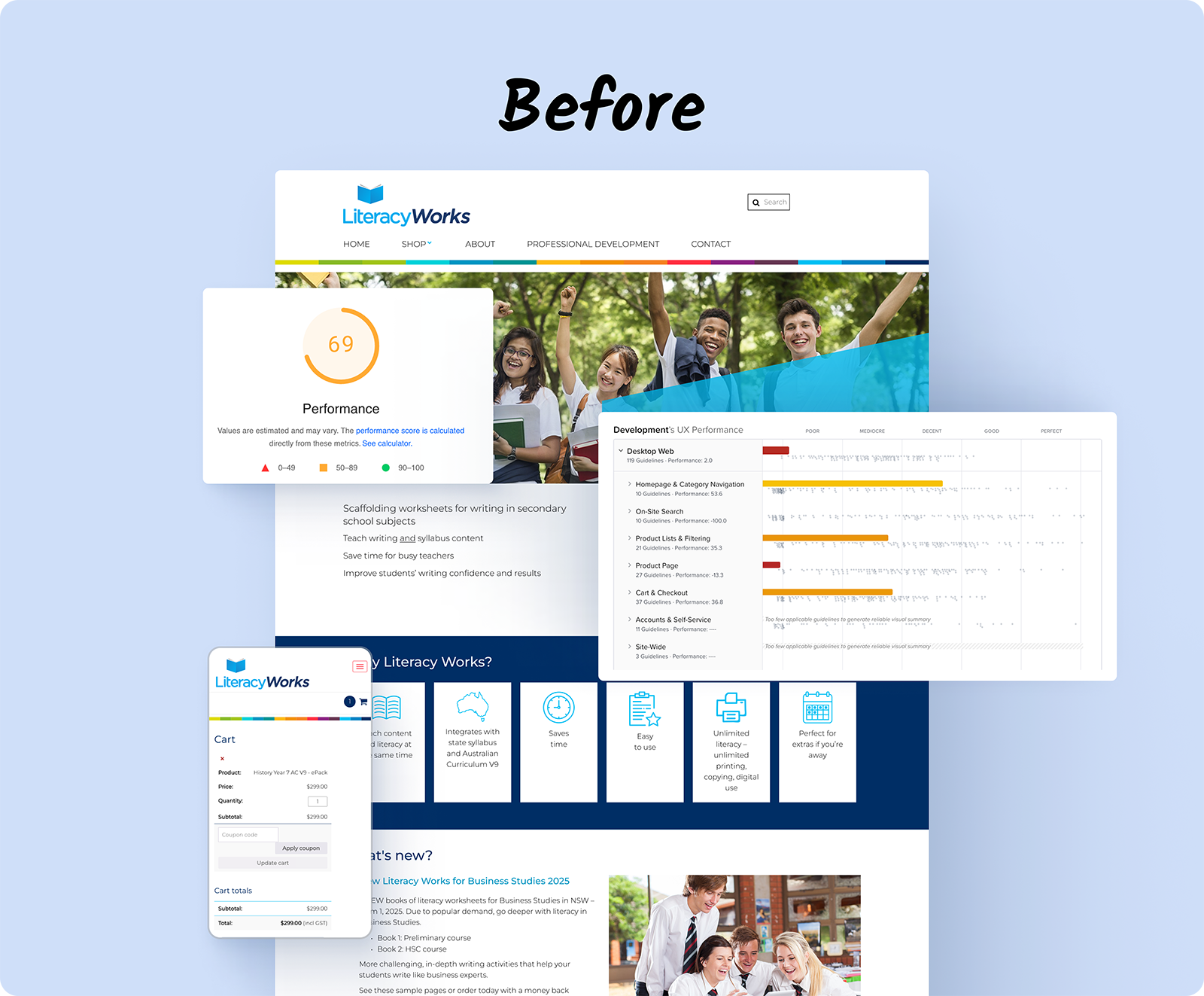
We don’t run a single-angle audit. Every engagement runs through the same integrated diagnostic process we’ve built over 11 years and hundreds of WooCommerce stores, across four layers: UX, performance, analytics, and the underlying WooCommerce build. LiteracyWorks had problems on all four.
UX. A government procurement officer described the site as “felt outdated” during a contract review. The buying experience signaled neglect to exactly the audience writing the contracts. Our review of the purchase journey drew on around 250 UX guidelines distilled from Baymard Institute research, applied alongside the patterns we’ve seen across hundreds of WooCommerce stores – the source for the UX layer, not the whole method.
Performance. 4.2-second First Contentful Paint and a 69/100 mobile score. Competitors with weaker training programs were winning contracts because their sites loaded faster.
Analytics. A 46/100 SEO score left the store close to invisible in search – so the better product never reached the buyers comparing options. Session behavior showed visitors leaving before pages finished rendering.
WooCommerce build. A 5-year-old page builder injecting 1.2MB of unused code, 47 plugins loading on every request (most unused), and 3.2MB page weight for a simple product page. The architecture itself was the bottleneck.
- 4.2 second First Contentful Paint
- 69/100 mobile performance score
- 46/100 SEO score
- 3.2MB page weight for a simple product page
- 47 plugins running (most unused but still loading)
Why this hadn’t been solved
WordPress and WooCommerce power 40% of the web. They also carry 20 years of technical debt. Default installations load jQuery on every page, run dozens of database queries for simple operations, and ship megabytes of unused CSS and JavaScript. None of that is visible to a store owner running their business day to day.
For four years the work on the site was incremental: WordPress updates, security patches, minor changes. Useful maintenance, but it never touched the architecture underneath – so the load times, the page weight, and the SEO score kept dragging. The usual menu of agency answers wouldn’t have helped either:
- Expensive hosting upgrades (marginal improvement)
- Caching plugins (band-aid on structural problems)
- Platform migration (heavy cost and risk)
- Moving to headless architecture (significant investment)
After 11 years and hundreds of WooCommerce engagements, we knew the problem was architectural, not a reason to start over.
We’ll show you exactly where your store loses revenue.
We audit your store across UX, performance, and conversion, then show you the specific issues costing you orders – each one measured against revenue impact. You get a prioritised list of what’s losing money and what it’s worth to resolve.
- ✓239-point Baymard UX audit
- ✓Core Web Vitals + LCP + CLS benchmark
- ✓SemRush health benchmark
Every finding comes with the revenue it’s costing you and the lift from resolving it. You decide what’s worth doing.
The Blaze Commerce method: performance without migration
We’d worked with Trish since 2020 – WordPress updates, security patches, minor changes. That history gave us deep knowledge of her business: government contracts requiring instant invoice generation, training materials needing immediate download access, and physical workbooks shipping to remote mining sites.
View more of our client success stories →
The breaking point
When the procurement officer remarked that the site “felt outdated,” and competitors with weaker programs kept winning on speed, Trish weighed three options:
- Template refresh: cosmetic change only, minimal performance impact
- Basic optimization: band-aid changes, marginal improvement
- Performance Woo: category-leading performance through targeted architectural work on the existing site
She chose option 3.
What we did
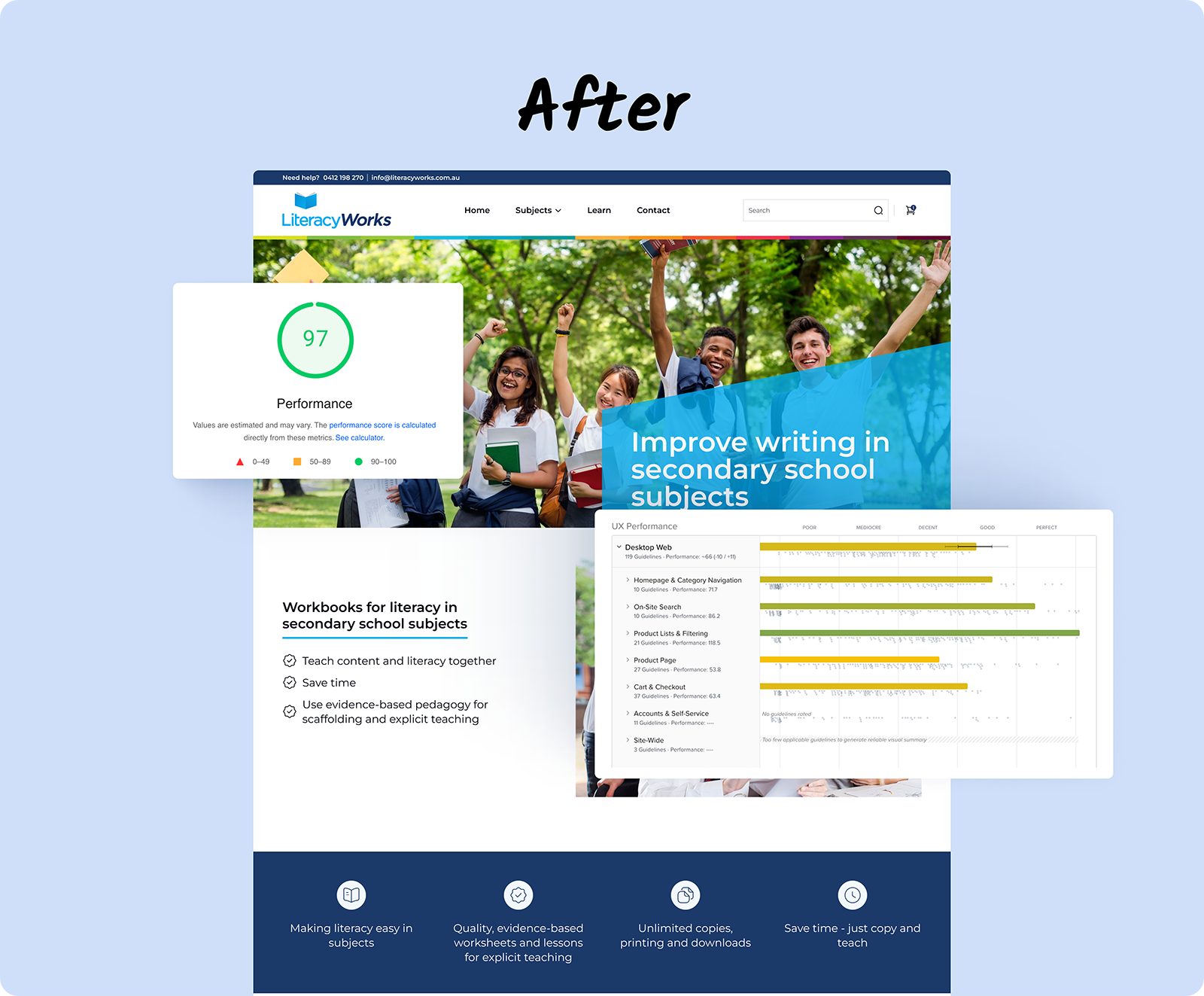
We don’t do rebuilds. In 11 years, we’ve never told a client to start over. The LiteracyWorks site after we shipped was the same site they came to us with – same URL, same content, same orders, same customer data. What changed was the theme layer, the failing UX and accessibility areas, and the performance configuration underneath. Same store, working properly.
Phase 1: Gutenberg migration
Stripped the 5-year-old page builder that was injecting 1.2MB of unused code. Restructured everything on native Gutenberg blocks. No third-party dependencies. Clean, semantic HTML.
Phase 2: database optimization
- Removed 47 unused plugins (each adding 5-10 database queries)
- Optimized WooCommerce session handling
- Introduced object caching for product queries
- Cleared 5 years of database bloat
Result: 78% reduction in Time to First Byte.
Phase 3: asset optimization
- Converted 400+ images to WebP format (60% smaller)
- Added native lazy loading
- Removed jQuery dependencies where possible
- Selective script loading (WooCommerce JS only on shop pages)
Result: page weight dropped from 3.2MB to 680KB.
Phase 4: caching architecture
- LiteSpeed Cache at server level
- Perfmatters removing unused scripts per page
- CDN with proper cache headers
- Critical CSS inlining
Result: half-second page loads for returning visitors.
Phase 5: WooCommerce-specific optimizations
- Streamlined order processing for digital downloads
- Deferred cart fragment loading
- Optimized checkout field validation
- AJAX add-to-cart without page reload
Results: category-leading performance, WordPress simplicity
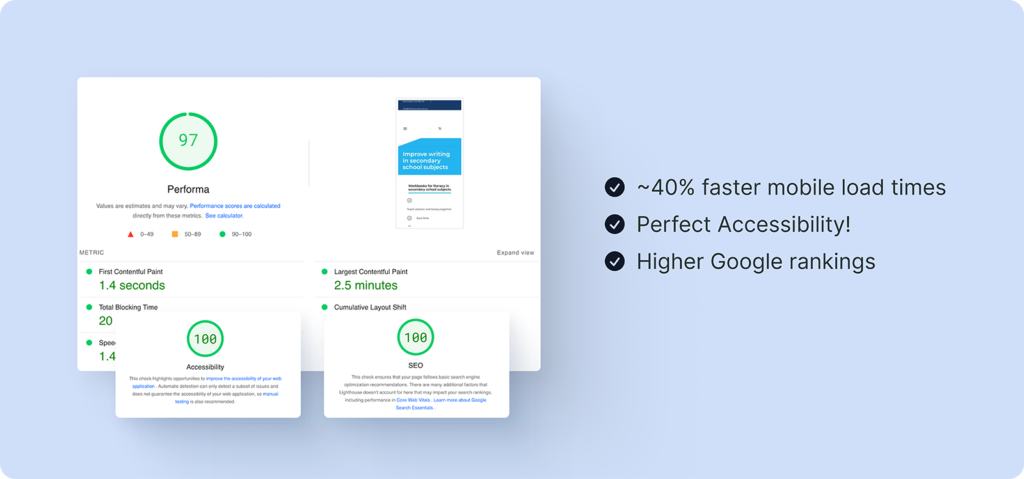
The most telling number wasn’t the speed score – it was the buying behavior behind it. Order volume rose 27%, but revenue climbed 260%. Once the store loaded fast and read as credible to government buyers, larger contracts started landing.
Technical metrics
| Metric | Before (Mobile) | After (Mobile) | Improvement |
| Performance | 69/100 🟠 | 97/100 🟢 | +28 (Mobile) |
| Accessibility | 83/100 🟠 | 100/100 🟢 | +17 to +25 |
| Best Practices | 96/100 🟢 | 93/100 🟢 | Minor variation |
| SEO | 46/100 🔴 | 100/100 🟢 | +54 (Massive!) |
Business impact
- Revenue: +260% year-over-year
- Net sales: +232%
- Session duration: +340%
- Download support tickets: down 100%
The notable part: order volume increased 27%, but revenue jumped 260%. Better performance and a more credible buying experience attracted larger orders from government and corporate buyers.
Why this approach works
After 11 years and hundreds of WooCommerce engagements, we’ve learned:
- The best solution maintains business continuity. Trish still updates content herself. Her custom invoice system still works. Her fulfillment process didn’t change. Everything runs 5x faster.
- Most performance issues are architectural, not platform-based. WordPress and WooCommerce can be fast. They’re not fast by default.
- Migrations are expensive and risky. Moving platforms means retraining staff, reconnecting integrations, and hoping nothing breaks.
- You don’t need experimental tech for category-leading performance. Half-second loads are achievable through proper optimization of native WordPress.
Who this works for
Performance Woo is ideal for:
- WooCommerce stores doing $20k-$2M monthly revenue
- Businesses wanting category-leading speed without heavy complexity
- Stores with custom functionality worth preserving
- Owners who update their own content
- Companies selling digital products, physical goods, or both
It’s not for:
- Stores needing multiple frontend applications
- Businesses with dedicated development teams
- Stores already achieving sub-1-second loads
The investment reality
Typical “solutions” and their problems:
- Premium hosting: monthly recurring costs with minimal improvement
- Basic speed optimization: temporary band-aids that degrade over time
- Platform migration: heavy disruption to your business operations
- Custom development: complex solutions requiring ongoing technical support
Performance Woo: our clients typically see complete return on investment within 3-4 months based on increased sales from performance and UX improvements. 2-3 week timeline. No platform change. No business disruption.
For LiteracyWorks, the 260% revenue increase covered the investment in the first month.
Frequently asked questions
Will my existing plugins still work?
We audit everything. Most sites carry 20+ unnecessary plugins slowing them down. We keep what provides value, replace what doesn’t, and optimize what remains. LiteracyWorks kept every plugin that earned its place and lost the 47 that didn’t.
What happens to my custom functionality?
We preserve all business logic. LiteracyWorks kept their instant download system, government invoice generation, and bulk order processing – same workflows, running on a faster site.
Do I have to migrate platforms or start over?
No. We don’t do rebuilds. The site stays on WordPress and WooCommerce – same URL, same content, same orders, same customer data. We resolve the specific failures on the existing site instead of reconstructing it from the ground up.
How long do these improvements last?
Architectural improvements are durable. Unlike band-aid changes, they hold up with basic maintenance, so the site stays fast long after launch.
Can’t I get the same result from caching plugins?
Caching helps, but it doesn’t resolve the underlying problems. It’s like putting premium fuel in a broken engine – the structural issues are still there.
Should I get a UX audit first?
Our ecommerce UX audit service identifies conversion blockers before the work begins. For LiteracyWorks, we addressed the UX and accessibility issues as part of the Performance Woo engagement.
The path forward
Two options for WooCommerce store owners:
Get access to our Performance Audit. We analyze your specific bottlenecks and show exactly what’s slowing your store. Includes Core Web Vitals analysis, plugin audit, and prioritized recommendations.
Schedule a demo to see real client sites achieving sub-1-second loads on native WooCommerce. 30-minute screen share. No pitch unless you ask.
LiteracyWorks has worked with Blaze Commerce since 2020. Performance improvements measured via Google PageSpeed Insights and GTmetrix. Revenue data from Google Analytics year-over-year comparison. Explore their workplace literacy training resources →
Get my Revenue Recovery Audit
We score your store against the same 245-point Baymard standard we run on every audit, benchmark your mobile PageSpeed, and send the findings within 7 days – each gap ranked by revenue impact.
Get My Revenue Audit →Every gap is tied to a dollar figure and a priority.
Talk directly with Campbell
Founder · 11 years WooCommerce
Schedule a strategy call
30 minutes with Campbell on your UX and performance challenges with WooCommerce – especially if you’re in a restricted vertical where paid ads aren’t an option.
Schedule My Strategy Call →30 minutes. No pitch – an honest assessment of where you stand.