

SEO decides whether your WooCommerce store gets found. For ecommerce, the stakes are higher than most sites: a slow, badly structured storefront does not only rank lower, it loses sales on every visit search does send you. This guide covers the SEO levers that move the needle on a WooCommerce store – performance, semantic markup, structured data, metadata, URL handling, international setup, accessibility, and technical SEO – and where a headless build earns its cost versus where it is overkill.
Bottom line: headless WooCommerce is the fastest option, and speed feeds SEO – but a $70K+ headless build only pays back above roughly $3M in annual revenue. Below that, most stores reach the same half-second page loads (460-560ms) through WooCommerce optimization, at about a third of the cost and without rebuilding anything. The SEO fundamentals below apply either way.
A note before we start: this guide gets into performance and technical SEO. If that is your world, the detail is here. If it is not, the short version is simple – speed and clean structure help rankings, most stores reach high-performance loads through optimization instead of a rebuild, and we handle the complexity for the owners who would prefer not to. Skip to the FAQ for what that means for your store, or keep reading for how each piece works.
Performance Optimization
Why Speed and Core Web Vitals Decide Rankings
Website speed is a ranking factor and a conversion factor at the same time. Google’s Core Web Vitals – Largest Contentful Paint (LCP), Interaction to Next Paint (INP), and Cumulative Layout Shift (CLS) – measure how a real page feels to a real user. Slow LCP costs you rankings on search results pages and revenue on the visits you already earn. The data is consistent here: Deloitte’s Milliseconds Make Millions study found a 0.1-second improvement in load time lifted retail conversions by 8.4%.
How We Get WooCommerce Stores to Half-Second Loads
Most WooCommerce stores reach half-second page loads (460-560ms typical) without a rebuild. The work is unglamorous and it compounds: efficient rendering, disciplined caching, image optimization, database cleanup, and cutting the plugin bloat that drags response times. We took Austin Natural Mattress from a slow mobile experience to a fast one this way – see the Austin Natural Mattress case study. For a high-volume store where speed has to be extreme, a headless build pushes further still: AdMerch cut page load times by 82%, detailed in the AdMerch case study.
Which path fits your store depends on revenue. A headless build runs $70K+ over four to six months, so the conversion lift it buys has to pay that back – which in practice means a store doing $3M+ a year, often with checkout or performance buckling under peak load. Below that threshold, optimization gets you the same half-second loads for about a third of the cost. We walk through that decision in when not to go headless with WooCommerce.
Semantic Markup
Why Semantic HTML Matters for SEO
Semantic HTML uses tags that carry meaning – <header>, <nav>, <main>, <article> – so search engines can read the structure and context of a page, not guess at it. It also improves accessibility, which makes the site more usable for people relying on assistive technology. Clean markup is one of the cheapest SEO wins available, and most themes get it wrong by stacking generic <div> elements where structural tags belong.
Markup for Homepage, Category, and Product Pages
Whether your storefront is a WordPress theme or a headless frontend, the markup should follow the WHATWG HTML standard so crawlers can index it cleanly:
- Homepage:
<header>,<nav>,<main>, and<footer>to structure the page. - Category Pages:
<section>and<article>to group products logically. - Product Pages:
<h1>for the product title,<p>for descriptions, and<img>with descriptivealttext.
Get this right and search engines crawl and index the store with less friction, which shows up in coverage and rankings over time.
Structured Data
Structured data is a standardized format that tells search engines what a page is about – product, review, breadcrumb, FAQ. It is what earns rich results: star ratings, price, and availability shown directly in the search listing. Those rich results lift click-through rates, which is free traffic on rankings you already hold. On WooCommerce, product and review schema are the highest-value markup to get right, and most stores either miss them or emit them with errors.
A headless frontend renders this markup server-side, so it is present in the initial HTML instead of injected by JavaScript a crawler may not run. On an optimized WordPress storefront, an SEO plugin handles the same job – the point is that the structured data is complete and valid, not which architecture produces it.
Metadata and SEO Plugins
Title tags and meta descriptions decide how your pages appear in search results and influence whether anyone clicks. They are not a direct ranking factor, but a clear, specific description earns clicks that a generic one loses. WooCommerce stores manage this through the SEO plugins most owners already run – Yoast, Rank Math, AISEO – which handle metadata, XML sitemaps, and canonical tags from inside the WordPress admin. A well-built headless WooCommerce store keeps that plugin layer intact, so the SEO workflow you know does not change.
Redirects and URL Management
Redirects and stable URL structures protect the SEO equity you have already built. A 301 redirect carries link value from an old URL to a new one and keeps users out of 404 dead ends; consistent permalink structures help search engines crawl and index the store efficiently. This matters most during a migration or a headless build, where a mishandled URL map can erase years of rankings overnight. We treat the redirect plan as a first-class deliverable on any rebuild, mapping every existing URL before launch so permalink structures stay intact and link equity is preserved.
International SEO and Accessibility
Selling across regions needs hreflang tags, localized content, and region-specific URLs so search engines serve the right version to the right audience. Get hreflang wrong and you create duplicate-content problems that suppress every localized page at once – a common and expensive mistake.
Accessibility belongs in the same conversation. Meeting WCAG 2.1 standards makes the store usable for people relying on assistive technology, reduces legal exposure, and reinforces the semantic structure search engines read. Accessible markup and SEO-friendly markup are largely the same markup – one effort, two payoffs.
Technical SEO
The technical layer controls how search engines reach and read the store:
- robots.txt: controls how search engines crawl the site and where they should not waste crawl budget.
- XML sitemaps: generated and kept current so search engines index new and changed pages quickly.
- Canonical URLs: prevent duplicate-content issues by naming the preferred version of a page – critical for WooCommerce stores with faceted category and filter URLs.
These are not exotic features; they are table stakes that most stores have configured incompletely. Clean sitemaps and correct canonicals alone resolve a large share of the indexing problems we find in audits.
Ecommerce Event Tracking
Tracking add-to-cart, product views, and purchases is how you learn where revenue leaks. The data tells you which pages convert, where shoppers drop, and which SEO traffic earns its keep – the difference between optimizing on evidence and optimizing on guesses. A clean event-tracking setup feeds the analytics layer we use to quantify revenue impact instead of reporting vanity metrics.
Success Stories
The SEO and speed work above is not theoretical. A few results from client stores:
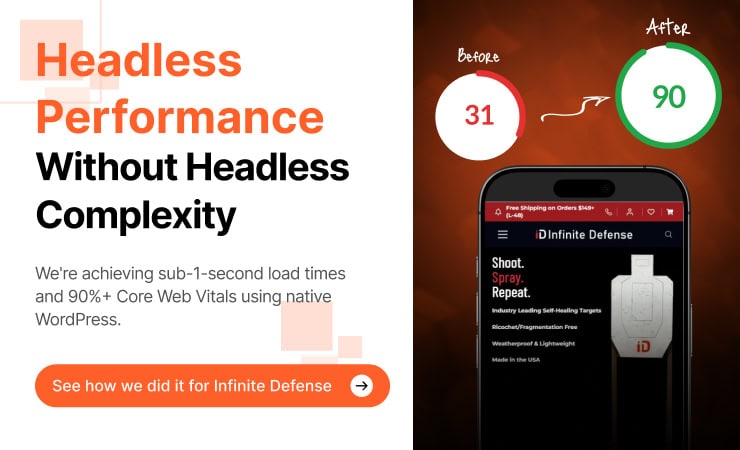
- Infinite Defense: mobile PageSpeed from 31 to 90 – read how we took mobile PageSpeed from 31 to 90.
- AdMerch: 82% reduction in page load times – read the AdMerch case study.
- Fastest WooCommerce page speed: a high-volume headless build pushed to the limit – see the fastest WooCommerce page speed.
Frequently Asked Questions
Does headless WooCommerce help SEO?
It helps through speed. A headless frontend renders fast and serves complete HTML, which strengthens Core Web Vitals and makes structured data reliable for crawlers. But headless does not improve SEO on its own – clean markup, correct canonicals, valid schema, and a sound URL structure matter more, and you can get all of those on an optimized WordPress storefront. Headless is worth it when a store needs extreme speed at high volume, not as a default SEO move.
Should my store go headless for SEO?
Probably not, and that is the honest answer for most stores. A headless build runs $70K+ over four to six months, so the conversion lift has to pay that back – which usually means a store doing $3M+ a year with performance buckling under load. Below that, WooCommerce optimization reaches the same half-second page loads (460-560ms) for about a third of the cost, with the same SEO fundamentals in place. When not to go headless walks through the decision.
How fast can a WooCommerce store get without going headless?
Most stores reach half-second page loads – 460-560ms typical – through optimization alone: efficient rendering, caching, image optimization, database cleanup, and removing plugin bloat. That is fast enough that speed stops costing sales and Core Web Vitals move into the green. Austin Natural Mattress and Infinite Defense are examples; the latter went from a mobile PageSpeed of 31 to 90 without a rebuild.
Will any of this change how I run my store?
No. You keep the WooCommerce admin and your SEO plugin – Yoast, Rank Math, or AISEO. Products, orders, pricing, content, metadata, and redirects are managed the same way, whether the store is optimized WordPress or a headless build. What changes is the frontend the shopper sees and how fast it loads, not your workflow.
What does the WooCommerce Revenue Audit include?
A paid, full diagnosis of your store across performance, UX, analytics, and build, with the specific revenue leaks quantified and a prioritized plan. For SEO and headless questions, it tells you straight whether a rebuild or optimization fits your store and revenue level – and what the speed and ranking gains are worth in dollars. Start My Audit.
The Bottom Line
Speed, clean markup, valid structured data, and disciplined technical SEO are what move WooCommerce rankings and revenue. Headless delivers the fastest loads, but it earns its $70K+ cost only above roughly $3M in annual revenue. For most stores, optimization reaches the same half-second page loads (460-560ms) at about a third of the cost, without rebuilding anything. The right move starts with knowing which side of that line your store sits on.
Start My Audit – we quantify your store’s revenue leaks and tell you straight whether optimization or a headless build fits your numbers.