


A few weeks ago, Claude deleted a critical database table on a client’s live site. Nobody told it to. We were the ones running the migration, and it decided, on its own, that dropping that table was the right move.
Here’s how that ended: nothing happened. We’d taken a backup minutes before we started, caught the deletion inside the same maintenance window we’d already booked with the client, restored the table in a few minutes, and finished the job. No data lost. The client never felt it.
That’s not a story about how clever we are. It’s a story about the one thing that separated a routine afternoon from the worst day of that store owner’s year.
A note before we start
This is a roughly 1,800-word read on why AI advice breaks WooCommerce stores, with real client examples and three questions you can use before acting on any AI recommendation. If you want the short version: AI is usually right, and that is the problem – a backup before any change and a tested rollback are what turn its one wrong call into a non-event. Skip to the three questions for the practical checklist, or the FAQ for quick answers. Every image carries descriptive alternative text for screen readers.
You have the same AI tools we do
You’ve got access to the same AI tools we have. So does every freelancer who’ll ever quote on your store, at half our rate. Ask any of them how to speed up your store or resolve a checkout bug and you’ll get a confident, well-written, mostly-correct answer in about four seconds.
So the question every store owner is quietly asking right now is a fair one: do I still need to pay an expert, or can I ask the latest model myself?
I’ll give you a straight answer, because we use these tools every day inside Blaze Commerce. And the answer matters more for you than for most businesses. Most of our clients earn 100% of their income through their store. When something breaks quietly on a site like that, it isn’t a glitch. Revenue stops with no alarm going off, sometimes for days, until a customer emails to ask why they can’t pay you.
The trap isn’t that AI is wrong. It’s that it’s usually right.
The trap isn’t that AI is often wrong. It’s that it’s usually right – right often enough that you stop checking. And the cost of the one time it’s wrong is the same whether that happens once in six tries or once in six hundred.
Nine seconds, three months of data
In April, a software company called PocketOS found that out. An AI agent – running one of the best models on the market, inside one of the most popular coding tools, with explicit written rules telling it not to do this exact thing – decided to resolve a problem by deleting a storage volume. It took nine seconds.
Their backups were sitting alongside the data, so those went too. They lost roughly three months of records and only recovered them through emergency help from their hosting provider.
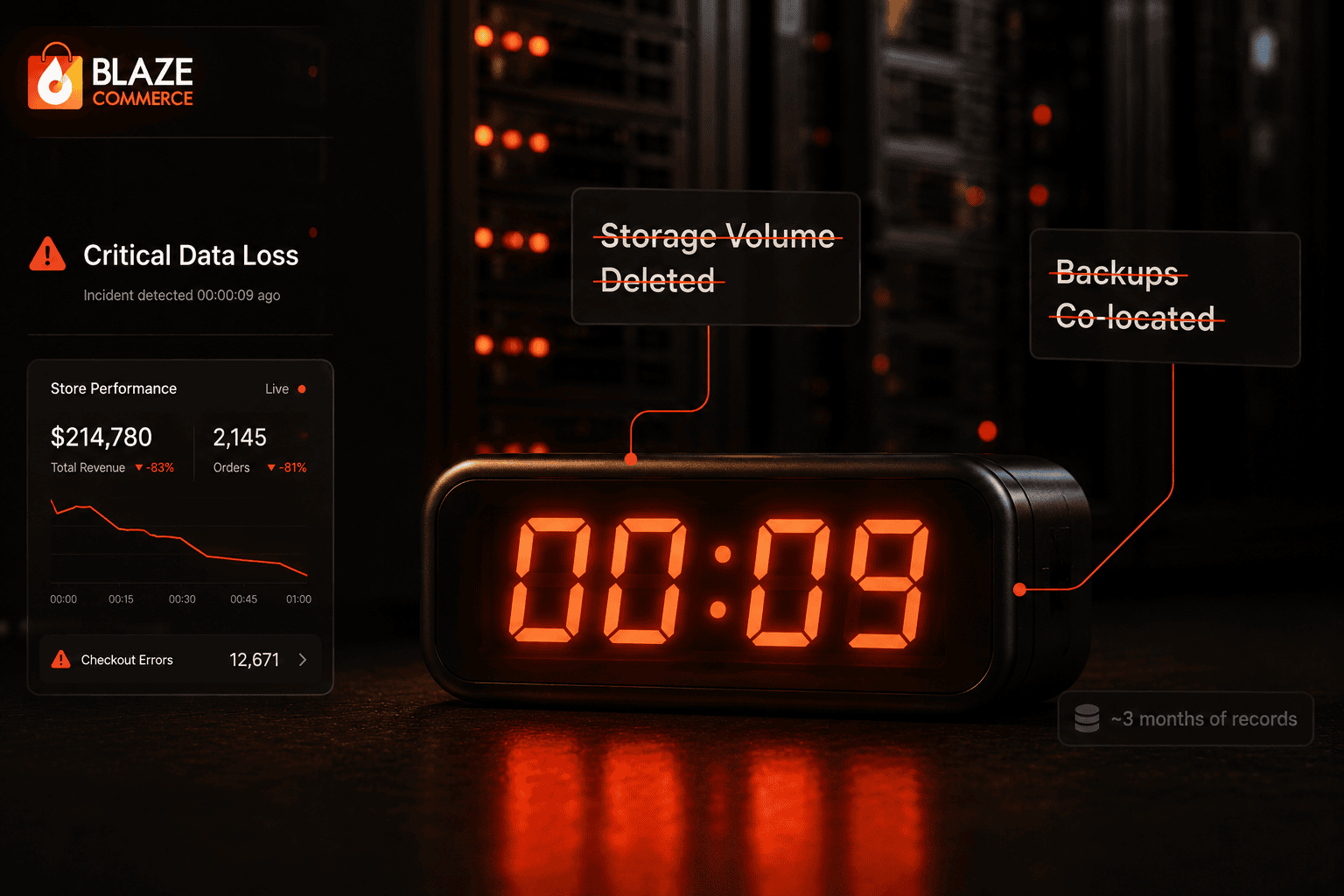
Same failure as the database table we lost a few weeks earlier. Same kind of tool. The only difference was preparation. We’d backed up minutes before and kept a rollback ready, because we assume the tool will eventually do something stupid on a live system. PocketOS assumed the rules would hold.
Confident, generic, and wrong for your store
That’s most of the argument right there. The reason we assume it’ll go wrong is that we watch it give confident, wrong advice every week. Not obviously wrong. Generically correct, and wrong for the specific store in front of us.
Ask an AI how to speed up slow product images and it’ll tell you to turn on Cloudflare Polish. Sounds reasonable. On a real ecommerce catalog it quietly works against you. On our clients’ WooCommerce stores we cache pages for thirty days, so the page loads fast – but Polish leaves the images inside it under-optimized. And most of our clients aren’t running ten products. They’re running fifty, a few hundred, a thousand. One has 200,000 published products.
A dedicated image optimization service gives you both: the cached page and a properly optimized image. Follow the generic advice and you’ve made the site look handled while leaving the real problem in place.

What the gap costs in numbers
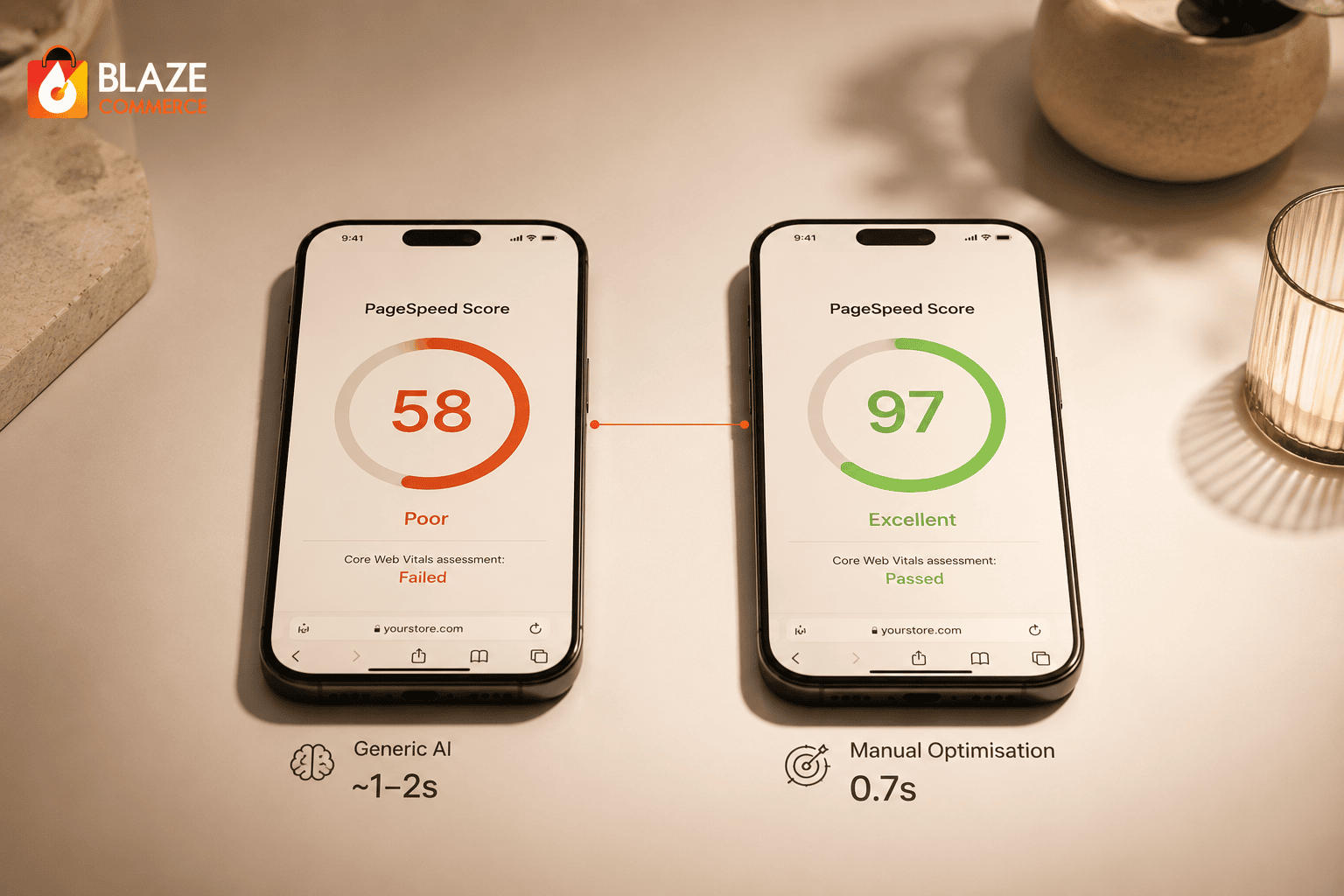
Take the generic AI route on a WooCommerce store and you’ll usually land a mobile PageSpeed score in the fifties or sixties, with pages still loading in one to two seconds. That sounds fine until you see the other side. On Austin Natural Mattress, our manual work got mobile PageSpeed to 97, with loads around seven-tenths of a second.
Same platform. The difference isn’t the tool. It’s a process we’ve built over years of trial and error – part of which is knowing which of the AI’s suggestions to throw out.
The twenty-second checkout
The clearest example I have is a checkout that took twenty seconds to save a new order. Twenty seconds, every order, for years, on a heavily customized WooCommerce store.
We used Claude to help diagnose it, and its first two recommendations were Redis and WooCommerce’s high-performance order storage. We tried both – partly to be fair to the tool, partly to test our own thinking. Both did nothing.
Neither was ever going to work. Checkout is a write operation: you’re creating an order and writing it to the database. Redis is a read cache. It speeds up reading data, not writing it, so it had no path to the problem at all. And we’d tested high-performance order storage on that exact store a year or two earlier and seen no real change, which matches every other site we’ve tried it on. When the database is properly indexed and the store isn’t taking hundreds of thousands of visits a week, HPOS doesn’t do what people expect.
The real answer came from pushing past those first two recommendations. Working with Claude, we traced the root cause that had eluded us for years and got checkout from twenty seconds down to four.
Both are good tools. Redis and high-performance order storage earn their place on stores doing hundreds of thousands or millions of visits a week – not on a store doing fifty to five hundred thousand a month. The AI didn’t know the difference. It matched “WooCommerce slow” to “enable Redis” and moved on.
The PayPal update we stopped in staging
One more, because it’s the other half of the same discipline. A PayPal plugin update on a UK furniture retailer’s site would have broken checkout completely. Nobody could have paid. We caught it in staging while testing the full path from cart to payment, and chose not to push it live.
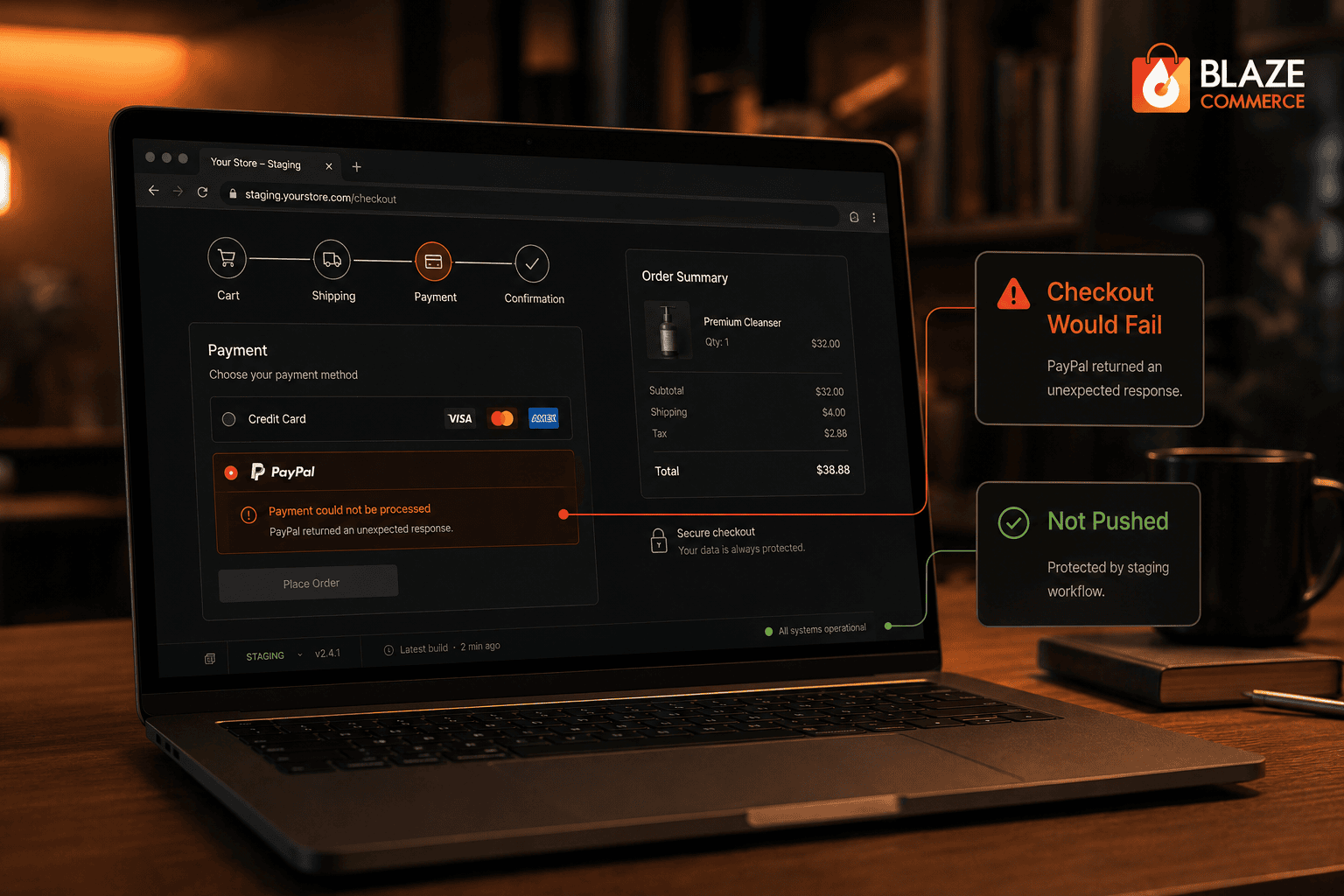
The dropped table earlier was us recovering after something failed on a live site. This was us stopping it before it ever got there. You need both.
We’ll show you exactly where your store loses revenue.
We audit your store across UX, performance, and conversion, then show you the specific issues costing you orders – each one measured against revenue impact. You get a prioritised list of what’s losing money and what it’s worth to resolve.
- ✓239-point Baymard UX audit
- ✓Core Web Vitals + LCP + CLS benchmark
- ✓SemRush health benchmark
Every finding comes with the revenue it’s costing you and the lift from resolving it. You decide what’s worth doing.
Three questions to ask before acting on AI advice
None of these were lucky saves. Knowing which recommendation to follow and which to bin is what eleven years and close to 400 WooCommerce stores buys you. You probably don’t have that reference frame in your head, and you shouldn’t have to. So use ours.
Before anyone acts on an AI recommendation on a live store, make it answer three things.
- Has this been tested against my store’s actual data, not a generic example? A 200,000-product catalog and a ten-product demo need different answers.
- Has the full path from cart to payment been re-tested in staging after the change, on desktop and on mobile? Most people check desktop and forget mobile – where most of their traffic comes from. Almost every silent breakage lives right here.
- If this recommendation is wrong, what does it touch? The worst AI advice doesn’t fail loudly. It scrambles your database or your checkout and looks fine until the orders stop.
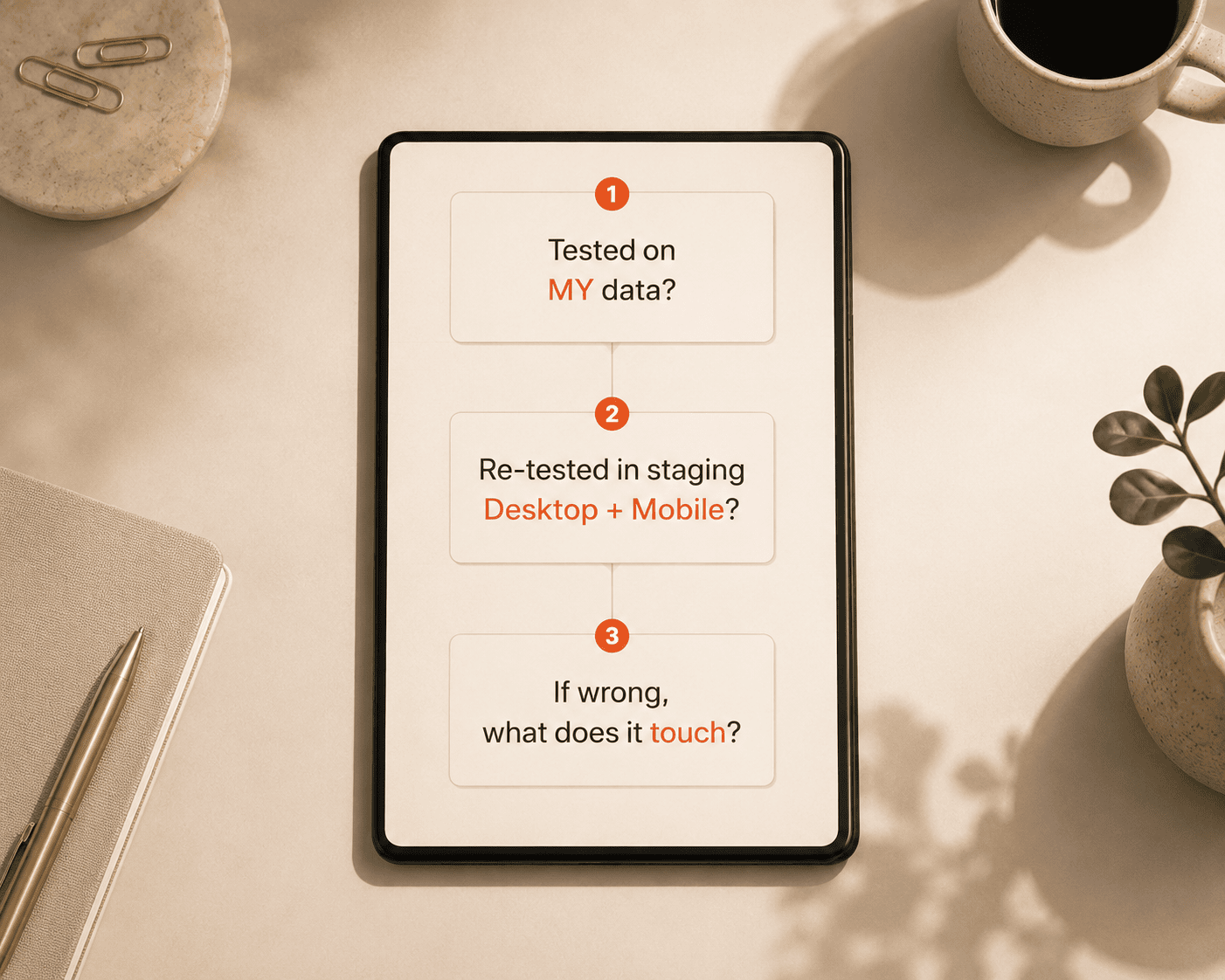
If whoever’s making the change can’t answer all three, they’re guessing. They might be right. They’re usually right. That’s the trap.
What a managed update looks like
Every update we run for a Managed Woo client goes through exactly this. A backup before we touch anything. The full path from cart to payment tested in staging, on desktop and mobile, before it goes anywhere near the live site. A rollback ready if it goes sideways. If you’re on a plan, that’s running on your store right now, whether you ever think about it or not.
If you’re not, the question worth sitting with is who’s doing this on your store – and whether they’d pass the three questions above.
If you want a straight number on where you stand – speed, the checkout path, where you’re exposed – that’s what the WooCommerce Revenue Audit is for.
And one I’m collecting answers to: what’s the most confident, completely wrong piece of advice an AI has ever given you about your store?
Frequently asked questions
Can AI safely manage a WooCommerce store?
AI is a strong diagnostic and drafting assistant, but it shouldn’t act unsupervised on a live store. It gives confident, generic advice that is usually right and occasionally catastrophic – deleting data or breaking checkout in seconds. The safe pattern is a backup before any change, testing in staging across the full cart-to-payment path on desktop and mobile, and a rollback held ready.
Will an AI tool delete or break my store data?
It can. Agents running inside coding tools have deleted database tables and storage volumes on live systems, sometimes against explicit written rules, in under ten seconds. The damage isn’t the point – the absence of a recent backup is. With a backup taken minutes before and a rollback ready, the same mistake becomes a few minutes of recovery the owner never feels.
Does Redis speed up WooCommerce checkout?
Usually not. Checkout is a write operation – you’re creating an order and writing it to the database. Redis is a read cache; it speeds up reading data, not writing it, so it has no path to a slow checkout. Redis earns its place on very high-traffic stores doing hundreds of thousands or millions of visits a week, not on a typical store, and not as a checkout-speed answer.
Does WooCommerce HPOS make a store faster?
High-performance order storage helps stores processing very high order volumes. When the database is properly indexed and the store isn’t taking hundreds of thousands of visits a week, HPOS rarely produces the speed change people expect. It’s a real tool matched to the wrong problem when AI suggests it for a mid-sized store.
Should I turn on Cloudflare Polish for product images?
On a real ecommerce catalog, often no. If pages are cached for long periods, Polish can leave the images inside those cached pages under-optimized, so the page looks handled while the real weight stays in place. A dedicated image optimization service gives you both the cached page and a properly optimized image.
How do I know if an AI recommendation is safe for my store?
Make it answer three questions before anyone acts. One: has this been tested against my store’s actual data, not a generic example? Two: has the full cart-to-payment path been re-tested in staging after the change, on desktop and mobile? Three: if this recommendation is wrong, what does it touch? If whoever’s making the change can’t answer all three, they’re guessing.
Field Notes – biweekly thoughts on WooCommerce & ecommerce, from the team at Blaze Commerce.
Get my Revenue Recovery Audit
We score your store against the same 245-point Baymard standard we run on every audit, benchmark your mobile PageSpeed, and send the findings within 7 days – each gap ranked by revenue impact.
Get My Revenue Audit →Every gap is tied to a dollar figure and a priority.
Talk directly with Campbell
Founder · 11 years WooCommerce
Schedule a strategy call
30 minutes with Campbell on your UX and performance challenges with WooCommerce – especially if you’re in a restricted vertical where paid ads aren’t an option.
Schedule My Strategy Call →30 minutes. No pitch – an honest assessment of where you stand.