


In June 2025 we delivered an audit on Austin Natural Mattress. By December the site was slower than the day we handed over the report. Largest Contentful Paint had gone from 16.5 seconds to 18.6. Layout shift had gone from zero to 0.464. SemRush site health had dropped from 90 to 74.
The report wasn’t wrong. Nobody acted on it, and someone rebuilt the site on top of the problems it described.
I’m leading with that because the failure wasn’t the diagnosis, and it’s the part of this story that usually gets cut.
A note before we start. This is a 7-minute read about what a WooCommerce audit finds, why store owners can’t find it themselves, and what happens when the findings sit in a document nobody executes. There’s a check at the end you can run on your own store this week without paying anyone. If you want the plain-language version of the technical terms, skip to the questions at the end.
The TL;DR:
- An audit identifies the work. It doesn’t do the work. Austin Natural Mattress’s developer shipped a rebuild with 0 of 250 UX findings implemented. Two months of paid work and every metric went backwards.
- Owners are blind to their own stores. You use the site every day, so you never have to find anything. The places a stranger gets stuck are invisible from the inside.
- Three findings come up more than anything else: on-site search that fails on typos and multi-word queries, product pages and checkout ordered for desktop, and hosting that can’t carry the uncacheable pages where money changes hands.
- Around a third of visitors use search when it’s there, and Forrester puts search users at two to three times more likely to buy than browsers. Most WooCommerce search is whatever the theme shipped with.
- The same audit, executed properly: AOV +88%, orders +250%, net sales +582%, mobile PageSpeed 28 → 97 in the first three weeks live. Same site, same URLs, same order history. No rebuild.
What Shane already knew, and what he didn’t
Shane runs Austin Natural Mattress. Two showrooms, twenty-five years, carrying Avocado, Naturepedic and Vispring. Mattresses that run into tens of thousands of dollars. Most of his revenue walks through the door, and the site’s job is to drive foot traffic and phone calls and hold up next to the brands sitting on his showroom floor.
He knew the site was slow. Every owner knows their site is slow — you can feel it loading your own product page.
What nobody had given him was the list. Which of the fifty things wrong with his store were costing money, in what order, and what each one was worth.
So we went looking. A senior WooCommerce developer and a senior ecommerce UX designer, a day or so each inside the store. Performance taken down to the database and the queries his theme and plugins were generating. The purchase journey scored across every step against research-backed standards. His analytics showed where buyers were leaving; working out why they left, and what each exit was worth, takes someone scoring the journey by hand.
Most stores never commission that second half.
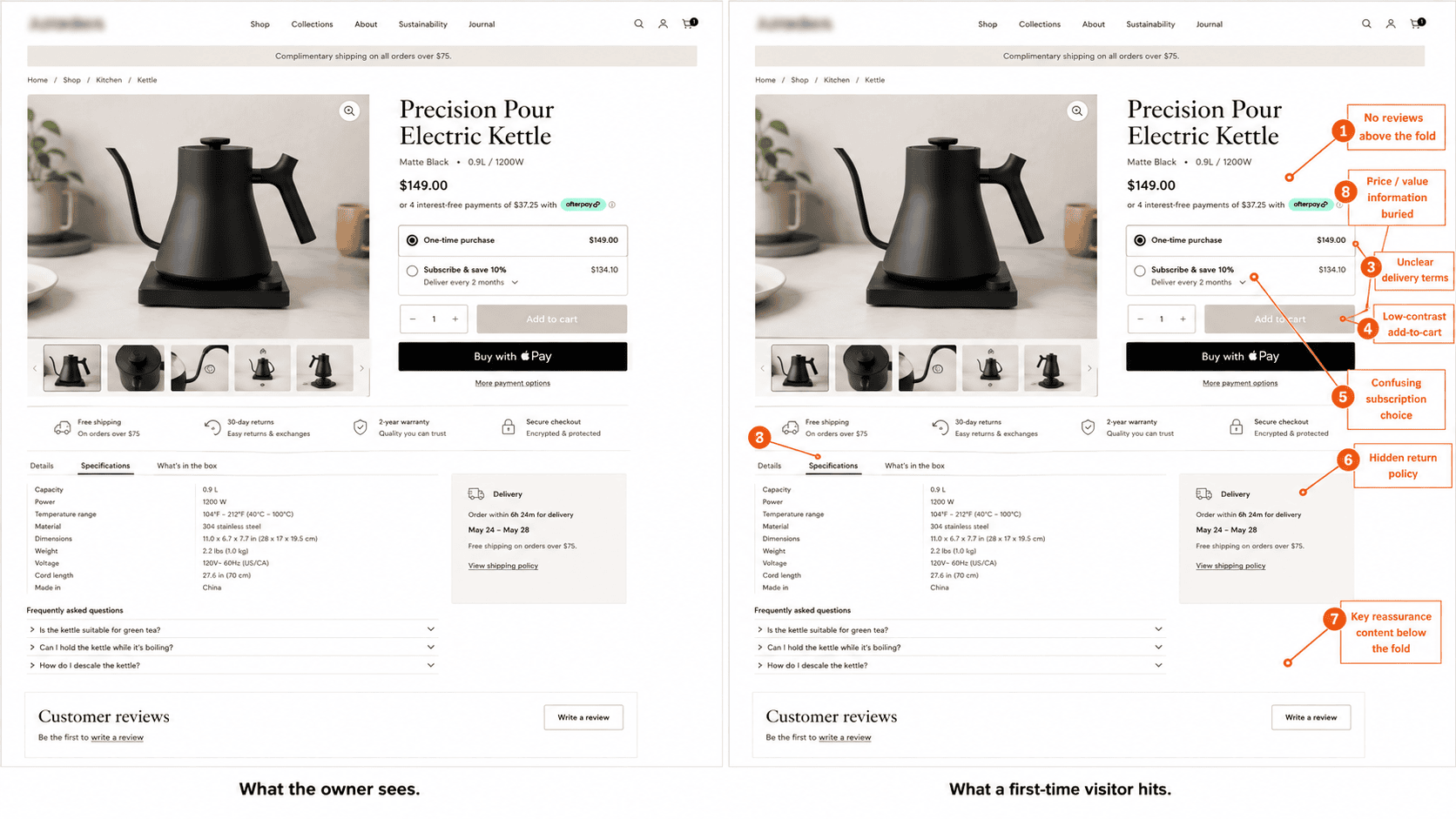
Why you can’t see it on your own store
Because you know where everything lives. You never have to find anything, so the places a stranger gets stuck are invisible from the inside. Familiarity is the problem, and no amount of care about the business solves it.
One client put it better than I could:
“We’re unaware of what you are aware of. I have zero awareness. I can’t look at a page and go, oh, that’s missing XY. I just visually go, oh, it looks good.”
Another, whose store gets most of its traffic on mobile:
“I personally am a complete weirdo. I do not shop from my phone at all. I literally never look at our mobile site. That’s on me.”
Both are competent operators running profitable businesses. Neither could see the thing costing them the most.
The three findings we see most often
Across close to 400 WooCommerce stores in eleven years, three problems come up more than anything else.
1. On-site search that doesn’t work
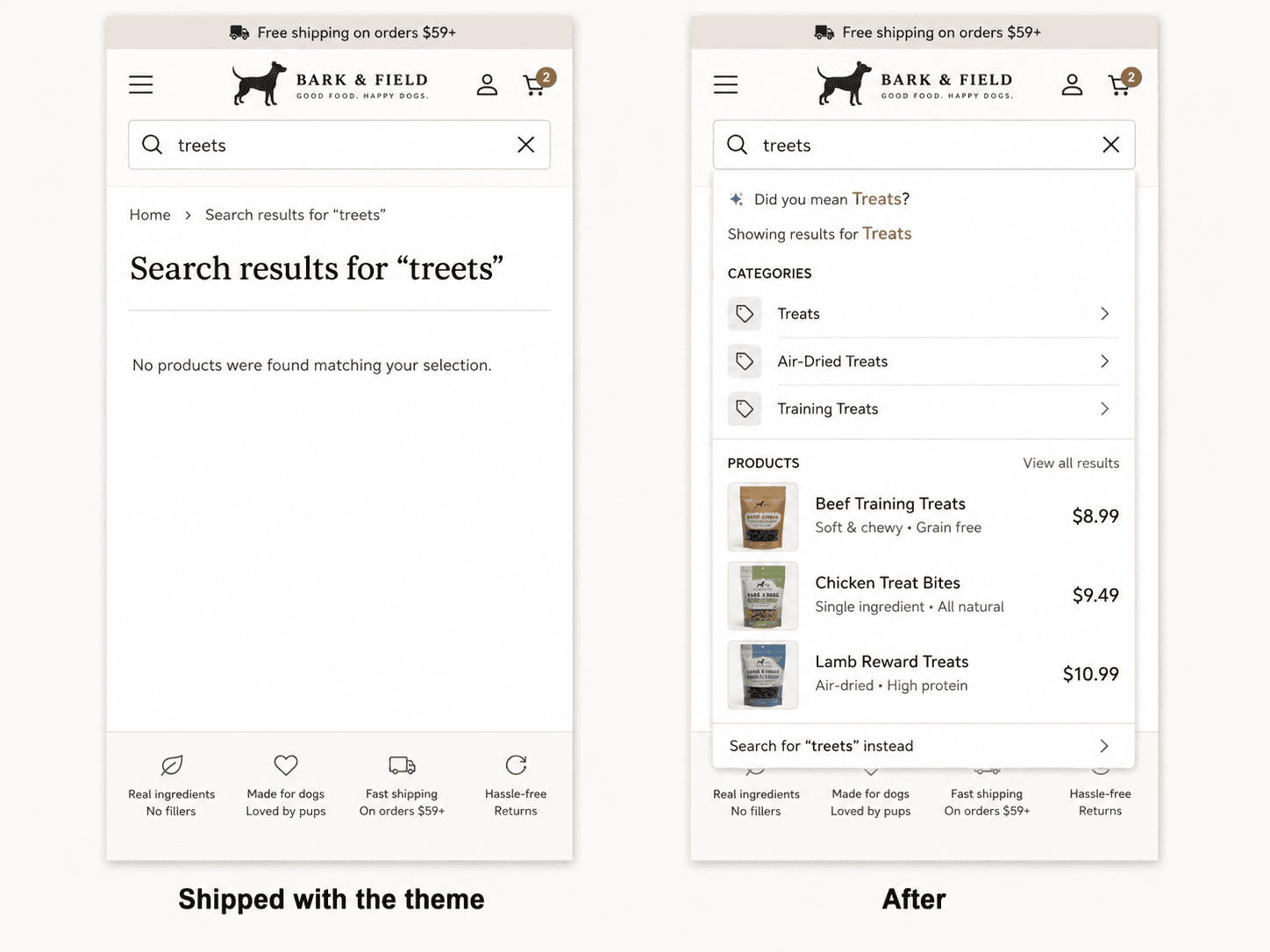
Around a third of visitors will use the search box if it’s there, and Forrester puts search users at two to three times more likely to buy than people who browse. Most WooCommerce search is whatever the theme shipped with, so it fails on typos, plurals and multi-word queries. It’s the most common finding in our audits.
One client watched her own store fail a search live on a call: “Wow! The search function isn’t working. Oh, my God!”
2. Product pages and checkout laid out for a desktop
Mobile is the dominant traffic source for nearly every store we look at. Responsive is table stakes and most of these stores have it. The problem is order: the information a buyer needs to decide sits below three scrolls of specification, and the checkout asks for things in a sequence nobody would choose after watching one person attempt it on a phone.
3. Hosting that can’t carry WooCommerce
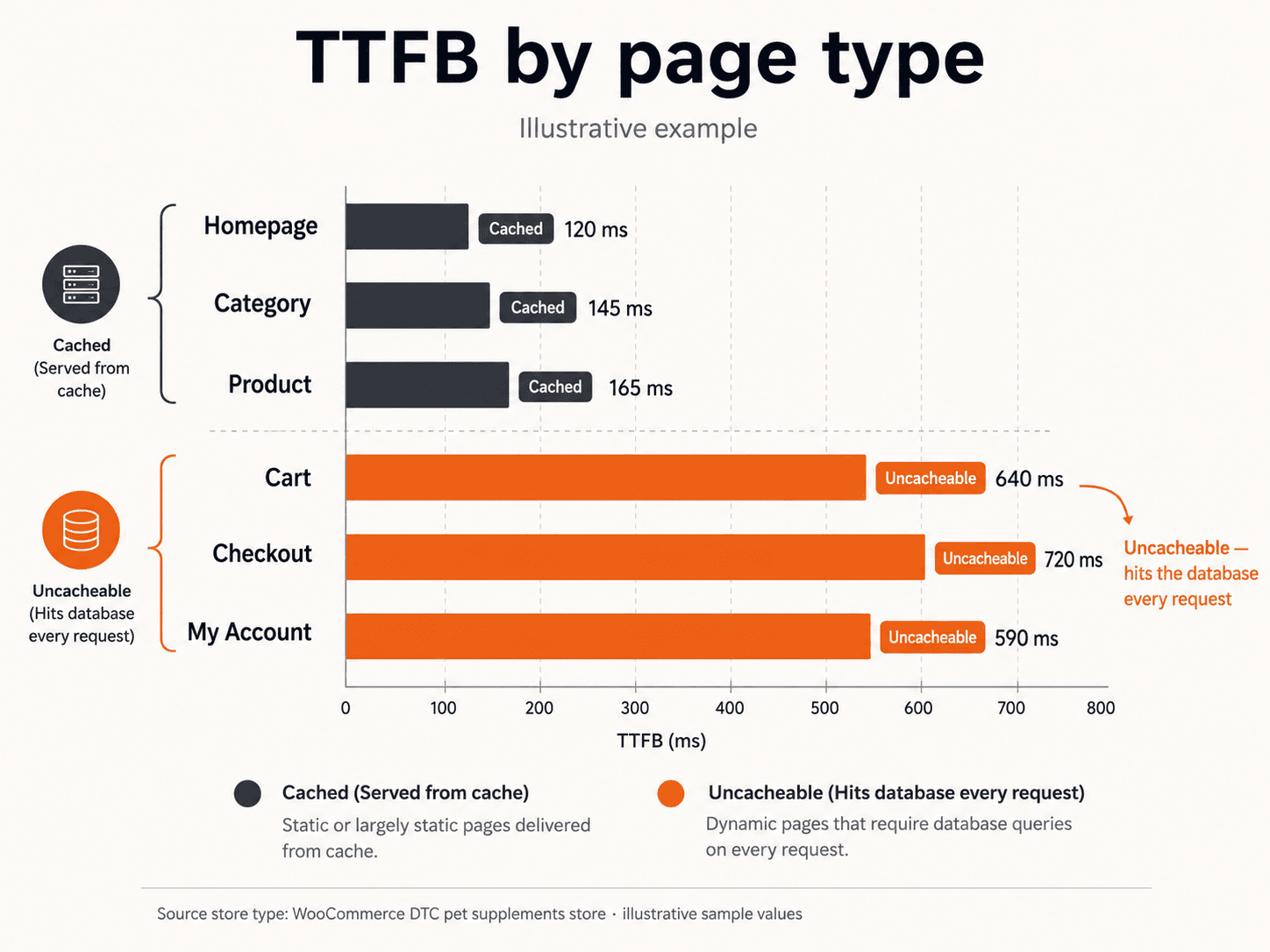
Cart, checkout and account pages can’t be cached, so they hit the database on every request. Hosting sold on a WordPress spec falls over on the exact pages where money changes hands.
We’ll show you exactly where your store loses revenue.
We audit your store across UX, performance, and conversion, then show you the specific issues costing you orders – each one measured against revenue impact. You get a prioritised list of what’s losing money and what it’s worth to resolve.
- ✓239-point Baymard UX audit
- ✓Core Web Vitals + LCP + CLS benchmark
- ✓SemRush health benchmark
Every finding comes with the revenue it’s costing you and the lift from resolving it. You decide what’s worth doing.
What happened next at Austin Natural Mattress
When we delivered the report, Shane’s developer was already partway through a rebuild and determined to ship it. She shipped it. None of the findings went in.
- Largest Contentful Paint: 16.5s → 18.6s. The metric that decides whether a visitor sees the page before they leave got 2.1 seconds slower.
- Cumulative Layout Shift: 0 → 0.464, on a site that hadn’t had a layout shift problem.
- SemRush site health: 90 → 74.
- Analytics still wasn’t recording revenue, which we’d flagged in the report.
- UX findings implemented: 0 of 250.
The rebuild went live without critical metadata and redirects the old site had, so it cost him rankings he’d spent years earning. And being a rebuild, it carried no order history, so nobody could measure what any of it had cost.
Two months of paid work, and the numbers went backwards.

It’s also why we don’t do rebuilds
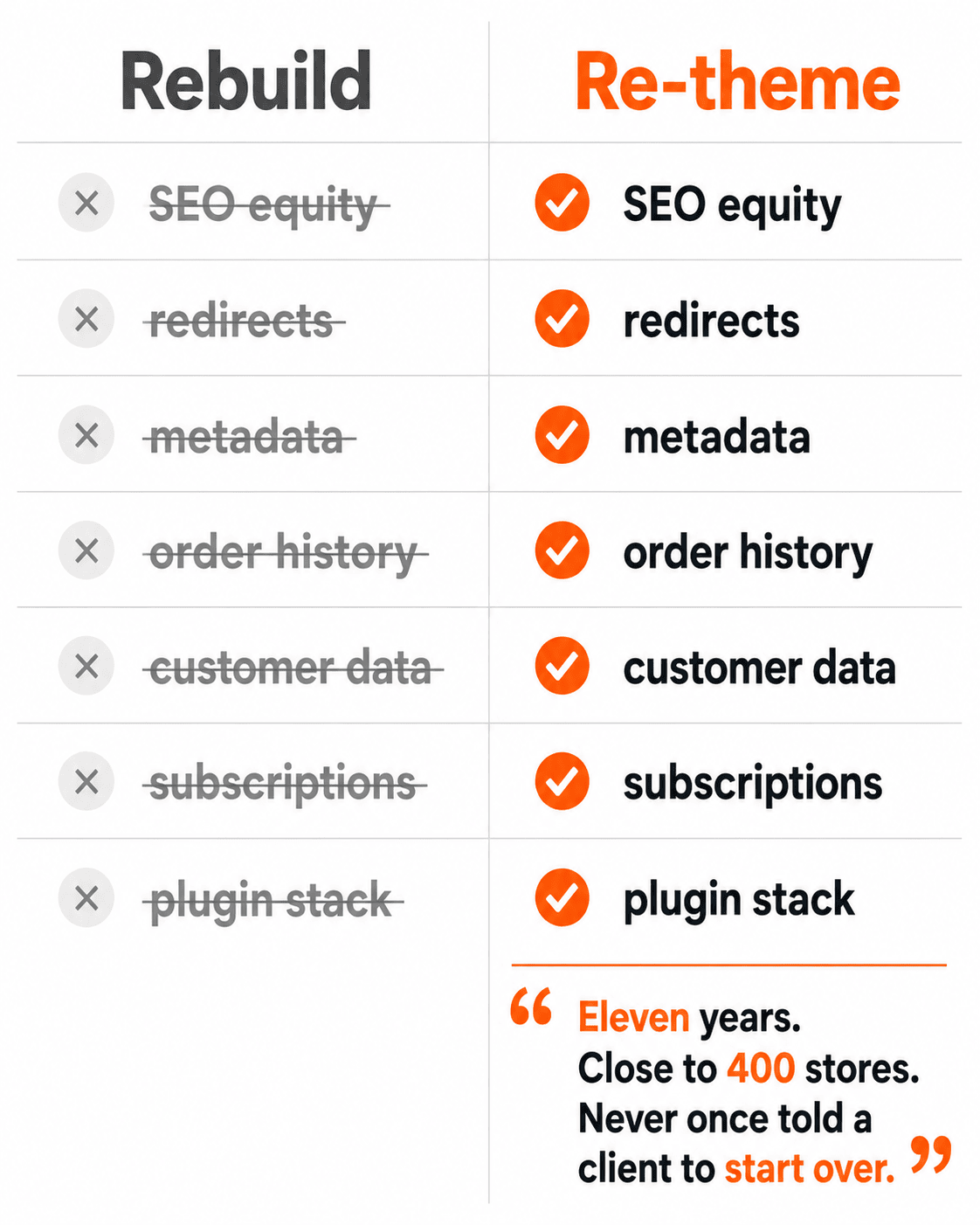
Eleven years, close to 400 WooCommerce stores, and we’ve never once told a client to start over. A rebuild throws away the SEO equity, the redirects, the metadata and the order history you’ve accumulated, then asks you to be pleased with a new-looking site. We re-theme what’s already there.
Which is what Shane got working with us. Same site, same URLs, same content, same customer data. New theme underneath, the UX findings applied across the purchase journey, performance rebuilt from the database up.
First three weeks live:
| Metric | Change |
|---|---|
| Average order value | +88% |
| Orders | +250% |
| Net sales | +582% |
| Mobile PageSpeed (homepage) | 28 → 97 |
The full breakdown of that work is in the Austin Natural Mattress case study.
What clients say about the report itself
“Thanks so much for this incredibly detailed report and the video the other day. You definitely caught things I would never have noticed – especially the database bloat and the image issues.”
Alan Maclachlan, Founder, newmanbands.com
“The audit was very good. Well done on issues identified, explanations and plan of attack.”
Neil Cutcliffe, Owner, deepspacesparkle.com
Both of them already knew their sites were slow before they paid us. Database bloat and image weight is the sort of thing they didn’t know.
One thing you can check this week without paying anyone
Open Google Analytics and pull your funnel: product views, add to cart, checkout views, checkout completions. Then run each of those for mobile and desktop separately and put them side by side.
Two things usually fall out.
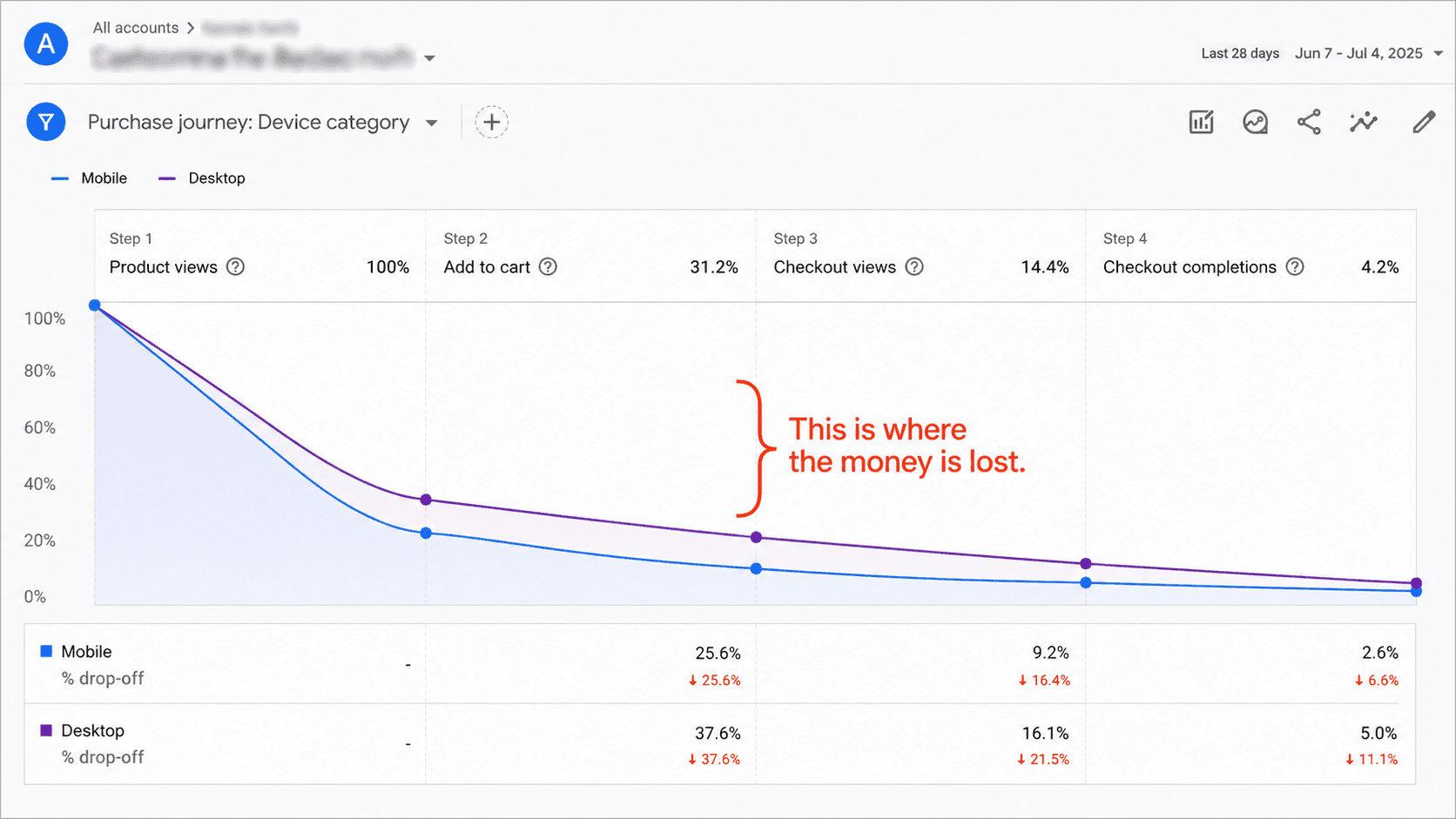
- Purchase events often aren’t recording revenue properly. Pull WooCommerce’s own sales report for the same period and compare totals. If they disagree by more than a few percent, every conversion decision you’ve made this year rests on numbers that aren’t real. Shane’s had been wrong for months and nobody had looked.
- You’ll find a mobile-to-desktop gap wider than you expected at one or two specific steps. Those steps are where the money is lost.
If you want the full picture
The WooCommerce Revenue Audit is US $995.
- Two senior specialists, four areas, five business days.
- Every finding ranked by what it’s costing you, with a resolution and a price against each one.
- You own the document, and it’s written so any competent WooCommerce developer can execute it — including the one you already have.
- Go ahead with the work within 30 days and the $995 comes off the cost of it.
We’ll show you exactly where your store loses revenue.
We audit your store across UX, performance, and conversion, then show you the specific issues costing you orders – each one measured against revenue impact. You get a prioritised list of what’s losing money and what it’s worth to resolve.
- ✓239-point Baymard UX audit
- ✓Core Web Vitals + LCP + CLS benchmark
- ✓SemRush health benchmark
Every finding comes with the revenue it’s costing you and the lift from resolving it. You decide what’s worth doing.
Frequently asked questions
What is a WooCommerce revenue audit?
A diagnostic across four layers of the store: performance down to the database and the queries your theme and plugins generate, the purchase journey scored step by step against research-backed ecommerce standards, the analytics that tell you where buyers leave, and the underlying WooCommerce build. Two senior specialists, five business days, US $995. Every finding is ranked by what it’s costing you, with a resolution and a price against each one. Analytics shows where buyers exit; working out why they left, and what each exit is worth, takes someone scoring the journey by hand. Most stores never commission that second half.
Why can’t I find these problems on my own store?
Because you know where everything lives. You use the site every day and never have to find anything, so the places a stranger gets stuck are invisible from the inside. Owners consistently know their site is slow — that’s the one thing you can feel loading your own product page. What they don’t see is database bloat, image weight, a search box that fails on plurals, or a checkout sequence that only breaks on a phone they never shop from. Two of our clients said versions of the same thing: they can look at a page and tell you it looks good, and that’s where their read ends.
Why does on-site search matter so much for WooCommerce stores?
Around a third of visitors will use the search box if it’s there, and Forrester puts search users at two to three times more likely to buy than people who browse. That makes search one of the highest-intent surfaces in the store. Default WooCommerce search is whatever the theme shipped with, so it fails on typos, plurals and multi-word queries — meaning your most motivated visitors get a no-results page. It’s the single most common finding in our audits.
Is mobile-responsive the same as mobile-first?
No. Responsive means a desktop layout that adapts to a smaller screen, and most stores we look at already have it. Mobile-first is about order, not width: the information a buyer needs to decide comes before three scrolls of specification, and the checkout asks for things in the sequence someone would choose after watching one person attempt it on a phone. When mobile is the dominant traffic source, that ordering decision is the difference between a store that converts and one that doesn’t.
Why does hosting fail specifically on cart and checkout?
Cart, checkout and account pages are personalized per visitor, so they can’t be served from cache. Every request hits the database. Hosting sold on a WordPress specification is benchmarked against cached pages, which is why it looks fine on the homepage and falls over on the exact pages where money changes hands. This is one of the three findings we see most often across WooCommerce stores.
Can a WooCommerce rebuild make a store worse?
Yes. Austin Natural Mattress’s rebuild shipped with 0 of 250 UX findings implemented. Largest Contentful Paint went from 16.5 seconds to 18.6, Cumulative Layout Shift went from zero to 0.464, SemRush site health dropped from 90 to 74, and analytics still wasn’t recording revenue. It launched without metadata and redirects the old site had, costing rankings built over years, and it carried no order history — so nobody could measure what any of it had cost. Eleven years and close to 400 WooCommerce stores in, we’ve never told a client to start over.
What does re-theming preserve that a rebuild doesn’t?
SEO equity, redirects, metadata, order history, customer data, subscriptions and the plugin stack you’ve built around how the business runs. Re-theming replaces the theme underneath and applies the audit findings across the purchase journey on the site you already have — same URLs, same content. Austin Natural Mattress’s first three weeks on that basis: average order value up 88%, orders up 250%, net sales up 582%, mobile PageSpeed from 28 to 97.
How do I check whether my analytics is recording revenue correctly?
Pull your Google Analytics funnel — product views, add to cart, checkout views, checkout completions — then pull WooCommerce’s own sales report for the same period and compare the revenue totals. If they disagree by more than a few percent, your purchase events aren’t recording properly and every conversion decision you’ve made this year rests on numbers that aren’t real. Run the same funnel for mobile and desktop separately while you’re there; the steps where the gap is widest are where the money is being lost.
Campbell Angus
Founder, Blaze Commerce
Field Notes — fortnightly thoughts on WooCommerce & ecommerce.