

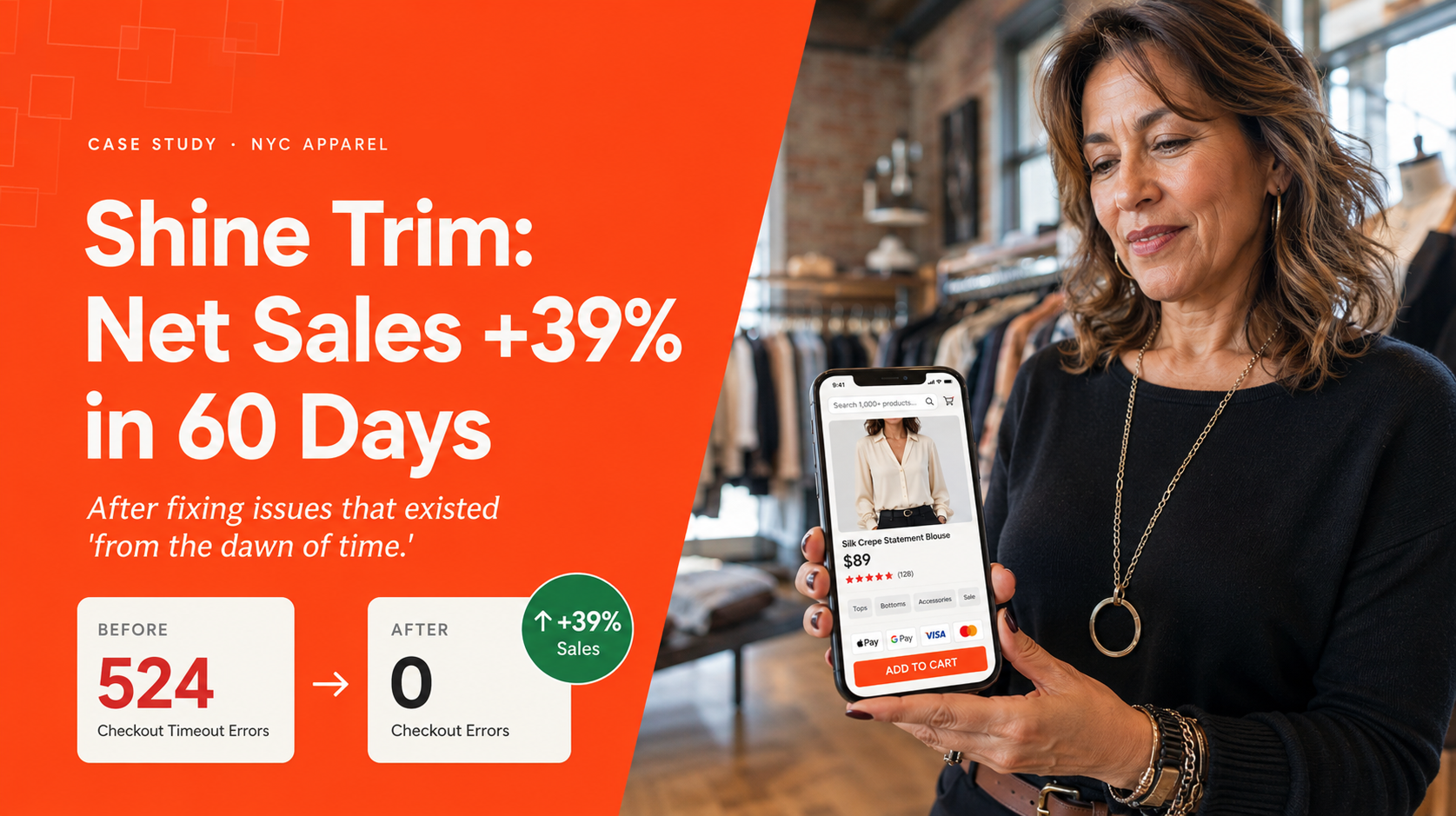
When Helen of Shine Trim first emailed us, she’d been running her NYC garment district apparel business since 2007. Three retail stores closed during COVID. Online, she was competing against Shein and Temu at fast-fashion prices with a catalog of 1,000+ products.
The site she’d been running for years had been giving her issues, in her words:
“From the dawn of time.”
Helen, Founder, Shine Trim
Checkout would time out. Orders would duplicate and charge customer cards twice. Customers couldn’t reliably complete a purchase.
“I don’t know how to fix it.”
Helen, Founder, Shine Trim
The TL;DR:
- Net sales up 39%, Orders up 28%, Items per order up 3%. Same store, post-launch performance.
- 524 checkout timeout errors eliminated. Duplicate orders charging customer cards twice – resolved. Failed orders that never captured payment – resolved.
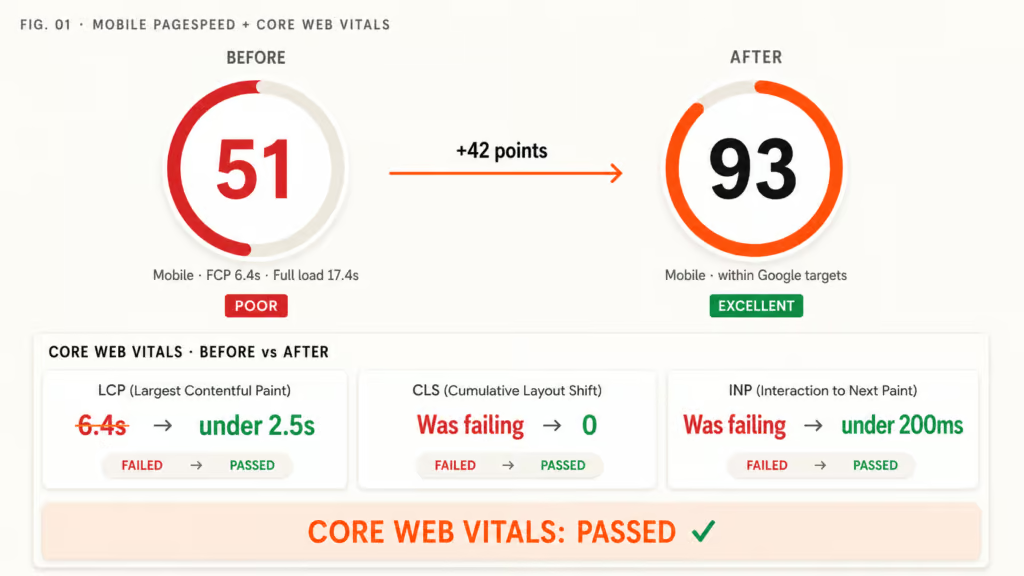
- Mobile PageSpeed 51 → 93. Core Web Vitals: Passed. 17.4-second full page load was killing the mobile audience that made up over half of traffic.
- 1,000+ products. No mobile search. Healthy product view rate is ~50%. Shine Trim’s was 7%. We added typo-tolerant mobile search across the entire catalog.
- 60 days. Same site, working properly. Same URL, same content, same orders, same customer data – no starting over.
Helen wasn’t competing with Shein on price – she was competing with Shein on whether her checkout would let a customer pay. We resolved the checkout. The conversion followed.
A note before we start: this case study gets into PageSpeed scores, checkout failures, and the WooCommerce build underneath them. If that’s your world, the detail is all here. If it isn’t, the short version is simple – Shine Trim’s store was slow and unreliable to buy from, we resolved that on the same site she already had, and the same customers started completing more purchases and spending more per order. Skip to the FAQ for what that means for your store.
What was broken across all four layers
We diagnosed Shine Trim the way we diagnose every WooCommerce store, drawing on 11 years and hundreds of WooCommerce engagements – across four layers:
- UX – how customers find, evaluate, and buy. For this layer we draw on the Baymard Institute’s ecommerce research alongside the patterns we’ve recognized across hundreds of WooCommerce stores
- Performance – PageSpeed and Core Web Vitals at the load, render, and infrastructure level
- Analytics – what the data showed about how Helen’s customers behaved on the site
- WooCommerce build – the underlying architecture, the theme, the plugins, the patterns introducing fragility
Shine Trim rated poorly across all four. Failing areas, in order of impact on the purchase journey:
Checkout reliability
524 timeout errors logged in the server records. Duplicate orders charging customer cards twice. Failed orders that never captured payment. The single most direct conversion killer on the site – and the source of the customer support complaints that had been pulling Helen’s attention away from running the business for years.
Mobile on-site search
None. A catalog of 1,000+ products and no way for a customer to search for any of them on a mobile device, where over half of Helen’s traffic came from. Even on desktop, search wasn’t typo-tolerant – a single misspelling of a product name returned zero results.
Product discovery
7% product view rate. Healthy is around 50%. Of every 100 visitors landing on the site, only 7 saw a product page. The rest left having seen the homepage, or less.
Performance
17.4-second full page load. 6.4-second First Contentful Paint. Mobile PageSpeed 51 out of 100. With the mobile audience making up over half of traffic, the performance gap was the conversion gap.
Mobile AOV gap
Mobile traffic was 53.5% of the total – roughly even with desktop. But mobile AOV was $48, against $88 on desktop. Mobile customers weren’t only converting less; the ones who did convert were spending close to half as much. The mobile audience was being lost at every layer of the journey, and a 58.6% bounce rate confirmed it.
Why this hadn’t been solved
The classic WooCommerce pattern. Multiple developers had worked on the site over the years. Generalists, without a deep understanding of WooCommerce. None of them resolved the underlying UX and reliability problems. Symptoms got suppressed. Structural causes stayed in place. The owner ended up paying month after month for “support” that maintained the broken state instead of addressing what was broken.
This is one of the most common patterns we see with WooCommerce store owners. A site accumulates years of patches without anyone ever surfacing the structural issues across the purchase journey – and the owner ends up further from a working site than where they started. Some replatform at this point. They wrongly believe WooCommerce is incapable of achieving the performance levels they demand. As our case studies show, that isn’t true.
Our diagnostic process exists for this pattern. Built from 11 years and hundreds of WooCommerce engagements. It surfaces the structural failures across UX, performance, analytics, and the underlying WooCommerce build – not the surface-level symptoms successive developers had been chasing.
We’ll show you exactly where your store loses revenue.
We audit your store across UX, performance, and conversion, then show you the specific issues costing you orders – each one measured against revenue impact. You get a prioritised list of what’s losing money and what it’s worth to resolve.
- ✓239-point Baymard UX audit
- ✓Core Web Vitals + LCP + CLS benchmark
- ✓SemRush health benchmark
Every finding comes with the revenue it’s costing you and the lift from resolving it. You decide what’s worth doing.
What we did – on the same site, working properly

We put two paths on the table. An emergency stabilization – resolve the timeouts, the duplicate orders, the missing mobile search within a week. Or a full transformation across the purchase journey, with the payment structure adapted to suit Helen’s cash flow. She chose the transformation.
We don’t do rebuilds. In 11 years, we’ve never told a client to start over. The Shine Trim site after we shipped was the same site Helen came to us with – same URL, same content, same orders, same customer data. What changed was the theme, the failing UX areas across the purchase journey, and the underlying performance configuration. Same store, working properly.
The work:
- Four-layer diagnostic. UX, performance, analytics, and the WooCommerce build – failing areas prioritized by purchase-journey impact.
- 524 checkout timeout errors resolved. Traced to specific failure points and addressed each one. Duplicate orders eliminated.
- Typo-tolerant mobile search added. Across the 1,000+ product catalog. Mobile search now works the way customers expect it to.
- Product discovery reworked. Categories surfaced, listing layout restructured, mobile navigation reworked for the 53.5% of traffic on mobile.
- Theme replaced. Removed the performance ceiling the old theme was imposing across every page type.
- Performance optimization across homepage, category, product, cart, and checkout. Mobile PageSpeed 51 → 93. Core Web Vitals: Passed.
Sixty days end to end.
Results: Net Sales +39%, Orders +28%, 524 Errors Eliminated
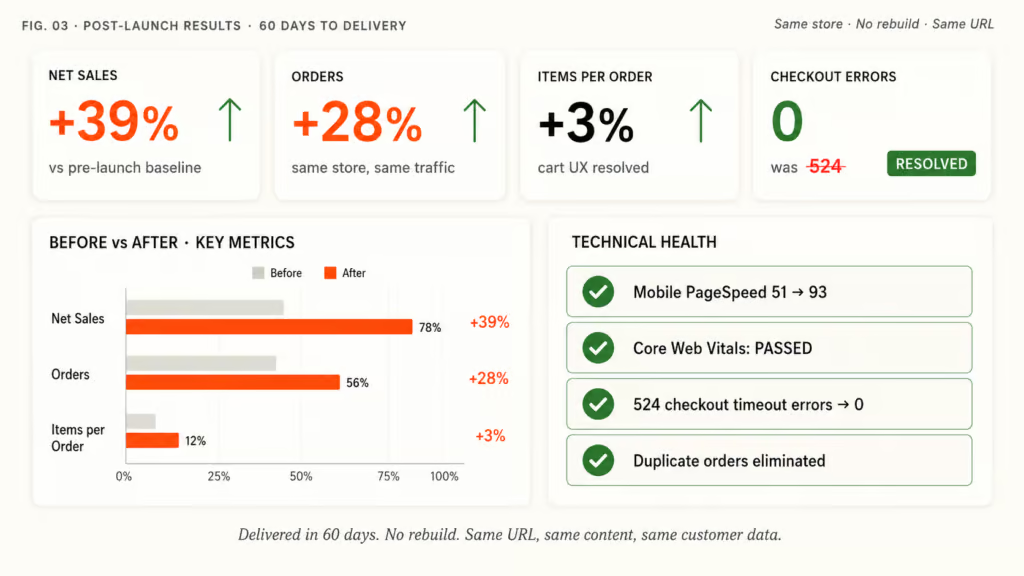
| Metric | Change |
|---|---|
| Net sales | +39% |
| Orders | +28% |
| Items per order | +3% |
| Mobile PageSpeed | 51 → 93 |
| Core Web Vitals | Passed |
| Checkout timeout errors | 524 → 0 |
Net sales lifted faster than orders – 39% versus 28% – because customers weren’t only completing more transactions, they were spending more on each one. Average order value climbed. When the user experience is spot on, customers stay longer, find more products, and add more to the cart before checking out. That’s where the AOV lift comes from.
The 524 checkout timeout errors going to zero is the silent multiplier under all of it. Every duplicate order Helen was refunding, every “your card was charged twice” support email, every failed payment that never reconciled – gone. Customer support load dropped. Refund processing dropped. The hours Helen had been spending firefighting checkout failures became hours she could spend running the business.
Mobile PageSpeed 51 → 93 with Core Web Vitals passed is the foundation that made the UX work effective. With the mobile audience making up over half of traffic and the mobile AOV gap closing, the customers Helen had been losing at every step of the journey are now completing purchases at desktop-comparable values.
If your WooCommerce store sounds like this
If your store has been giving you issues “from the dawn of time” – timeout errors, duplicate orders, checkouts that fail – while you’re paying monthly for support that never resolves the underlying problems, Shine Trim had the same problem.
WooCommerce out-of-the-box has poor UX. No off-the-shelf theme addresses the fundamental UX requirements of the purchase journey. And no maintenance arrangement without specialist WooCommerce expertise will surface what’s structurally wrong under successive layers of developer patches. Our optimization process exists for exactly this pattern.
Our framework is proven. Built from hundreds of WooCommerce optimization engagements over 11 years. Same store, working properly – that’s the work.
Frequently asked questions
Can a WooCommerce apparel store compete with Shein and Temu?
Not on price – but you don’t have to. Independent apparel stores compete on product specificity, brand identity, and customer experience. What kills them isn’t Shein and Temu directly – it’s a broken checkout that prevents committed customers from completing purchases at all. Shine Trim’s 524 checkout timeout errors and duplicate-order problems were costing more revenue than any Shein price comparison. Resolve the checkout. Make the mobile site work. Compete on the things you control.
What causes WooCommerce checkout timeout errors?
Multiple sources, but the most common are plugin conflicts at the checkout step, payment gateway API timeouts, server resource limits being hit during checkout calculation, and database query bottlenecks under variable load. The errors are logged in server records but most owners don’t know they’re there. Shine Trim’s 524 timeout errors had accumulated for years without anyone tracing them to their root causes. Resolving them required diagnosing each specific failure point – not patching the symptom at the checkout button.
Why does WooCommerce duplicate orders and how is it resolved?
Duplicate orders typically happen when a checkout request fails to return a confirmation in time, the customer reloads or re-submits, and the same payment is processed twice. The answer isn’t to add more buttons or warnings – it’s to resolve the underlying conditions that delay or fail the confirmation in the first place: plugin conflicts, database locks, payment gateway timeouts, server resource limits. Shine Trim’s duplicate-order problem was resolved by addressing the timeout errors that were causing the duplicates, not by patching the checkout button.
Can WooCommerce handle 1,000+ product catalogs at speed?
Yes – with the right theme, the right plugin stack, and the right performance configuration. Shine Trim runs 1,000+ products on WooCommerce with Mobile PageSpeed 93 and Core Web Vitals passed. The widely-held belief that WooCommerce can’t run large catalogs at speed is usually a function of bloated themes and unoptimized plugin stacks, not a platform limitation. Replatforming to Shopify or another platform to solve a performance problem WooCommerce can solve is one of the most expensive mistakes in ecommerce.
Should I replatform from WooCommerce because of performance issues?
Almost never. Replatforming typically costs $25K-$50K+, takes 3-6 months, breaks SEO equity, and frequently introduces new performance problems on the new platform. Most WooCommerce performance issues can be resolved by optimizing what’s already there – replacing the theme, resolving plugin conflicts, correcting the underlying architecture. Shine Trim went from 17.4-second page loads to passing Core Web Vitals on WooCommerce in 60 days. The platform wasn’t the problem. The patches that had accumulated on top of it were.
What is the four-layer WooCommerce diagnostic?
Built from 11 years and hundreds of WooCommerce engagements, our diagnostic looks at every store across four layers: UX (how customers find, evaluate, and buy – informed by ecommerce UX research and our own pattern recognition across hundreds of stores), Performance (PageSpeed, Core Web Vitals, infrastructure), Analytics (what the data shows about how customers behave on the site), and the WooCommerce build itself (architecture, theme, plugins, patterns introducing fragility). No single layer is the whole picture – the value is in integrating all four. Failures get prioritized by purchase-journey impact, not by visibility. The biggest revenue-killers usually aren’t the most visible problems.
Why do generalist developers fail to resolve WooCommerce stores properly?
WooCommerce out-of-the-box has poor UX defaults, and no off-the-shelf theme addresses the fundamental requirements of the purchase journey. A generalist developer can keep the site functioning but can’t see the structural failures across UX, performance, and the WooCommerce build – they don’t have the pattern recognition that comes from hundreds of WooCommerce engagements specifically. So they patch symptoms instead of resolving causes. Shine Trim’s site had been patched by multiple developers over years without any of them surfacing the 524 checkout timeout errors or the missing mobile search.
What does “Core Web Vitals: Passed” mean?
Core Web Vitals is Google’s set of three specific metrics that measure real-world page experience: Largest Contentful Paint (load speed, target 2.5s), Cumulative Layout Shift (visual stability, target 0.1), and Interaction to Next Paint (responsiveness, target 200ms). A site “passes” Core Web Vitals when all three metrics hit their thresholds. Passing improves Google search rankings, reduces bounce rate, and lifts conversion. Shine Trim went from failing all three to passing all three in 60 days.
How does typo-tolerant search impact apparel store conversion?
Significantly. Apparel customers search for brand names, product types, and specific items by name – and they misspell at high rates on mobile keyboards. A search that returns zero results on a misspelling is a customer lost. Typo-tolerant search corrects for misspellings automatically and surfaces the right products even when the query is wrong. For Shine Trim’s 1,000+ product catalog, adding typo-tolerant mobile search closed one of the largest product discovery gaps on the site.
What’s the difference between maintenance and optimization on WooCommerce?
Maintenance keeps the site running – security updates, plugin updates, backup management, patching things when they break. Optimization surfaces and resolves the structural issues across UX, performance, analytics, and the WooCommerce build that maintenance never touches. Most WooCommerce stores are on maintenance arrangements that maintain the broken state. Helen at Shine Trim had been paying for maintenance for years while the 524 checkout timeout errors went unaddressed. Optimization is what resolves the things maintenance has been quietly working around.
The pattern: years of patches, surfaced and resolved in 60 days
Shine Trim is the sixth case study we’ve shipped where the headline outcome wasn’t more traffic – it was the same store finally able to convert the traffic it already had. Net sales +39%. Orders +28%. 524 checkout timeout errors gone. Done in 60 days without starting over, without breaking the URL, without losing the customer history Helen had built since 2007.
Years of generalist developer patches had left Helen’s site further from working than where she’d started. The 524 checkout timeout errors hadn’t appeared overnight. The missing mobile search wasn’t an oversight from last quarter. The duplicate-orders problem had been an ongoing customer support burden. None of it had been surfaced by anyone she’d previously paid because none of them had the four-layer diagnostic that surfaces structural failures instead of treating symptoms.
If your store has been giving you the same kind of issues “from the dawn of time” – audit what’s structurally broken before you commit to another year of paying for maintenance that maintains the broken state.
Get my Revenue Recovery Audit
We score your store against the same 245-point Baymard standard we run on every audit, benchmark your mobile PageSpeed, and send the findings within 7 days – each gap ranked by revenue impact.
Get My Revenue Audit →Every gap is tied to a dollar figure and a priority.
Talk directly with Campbell
Founder · 11 years WooCommerce
Schedule a strategy call
30 minutes with Campbell on your UX and performance challenges with WooCommerce – especially if you’re in a restricted vertical where paid ads aren’t an option.
Schedule My Strategy Call →30 minutes. No pitch – an honest assessment of where you stand.